The JavaScript Universe
episode 02In the beginning was the Value.
What is a value? It’s hard to say.
What is a point in geometry? What is a word in human language? A value is a fundamental concept in JavaScript—so we can’t define it through other terms.
Instead, we’ll define it through examples. Numbers and strings are values. Objects and functions are values, too.
There are also a lot of things that are not values, like the pieces of our code—our if statements, loops, and variable declarations, for example.
Values and Code
As we start building our mental model, one of the first common misconceptions we need to clear up is that values are our code. Instead, we need to think of them separately—our code interacts with values, but values exist in a completely separate space.
To distinguish between values and code in my JavaScript program, I like to imagine this drawing of the Little Prince by Antoine de Saint-Exupéry:

I’m standing on a small planet, holding a list of instructions. This list is my program—my code. As I read through my list of instructions, I can see a lot going on—there are if statements, variable declarations, commas and curly braces.
My code contains instructions like “make a function call,” “do this thing many times,” or even “throw an error.” I read through these instructions step by step from the surface of my little world.
But every once in a while, I look up.
On a clear night, I see the different values in the JavaScript sky: booleans, numbers, strings, symbols, functions and objects, null and undefined—oh my! I might refer to them in my code, but they don’t exist inside my code.
In our JavaScript universe, values float in space.
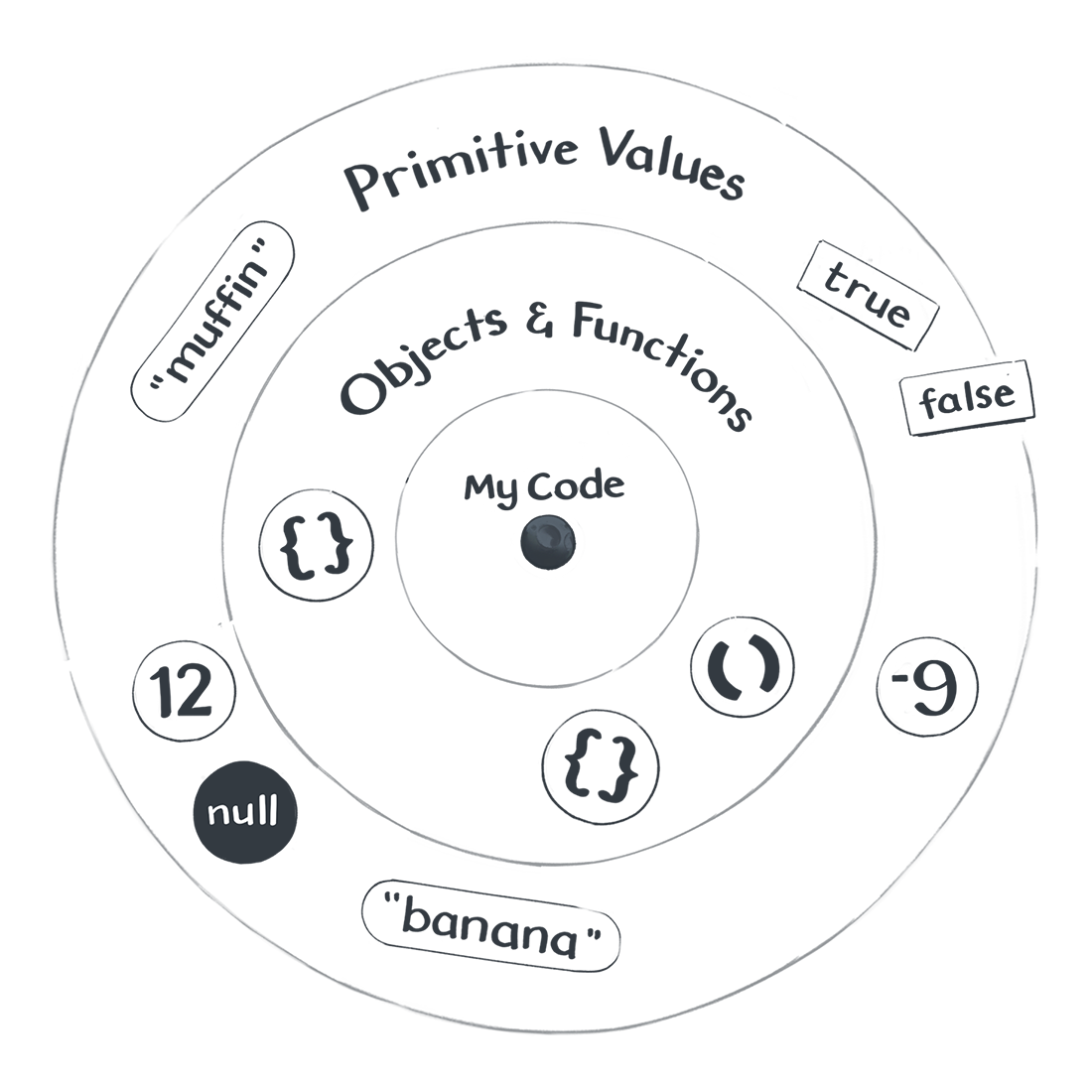
“Hold on,“ you might say, “I always thought of values as being inside of my code!” Here, I’m asking you to take a leap of faith. It will take a few more modules for this mental model to pay off. Give it five minutes. I know what I’m doing.
Values
Broadly, there are two kinds of values.
Primitive Values
Primitive values are like stars—cold and distant, but always there when I need them. Even from the surface of my small planet, I can find them and point them out. They can be numbers and strings, among other things. All primitive values have something in common: They are a permanent part of our JavaScript universe. I can point to them, but I can’t create, destroy, or change them.
To see primitive values in practice, open your browser’s console and log them:
console.log(2);console.log("hello");console.log(undefined);
Objects and Functions
Objects and functions are also values but, unlike primitive values, I can manipulate them from my code. If primitive values are like distant stars, then objects and functions are more like asteroids floating around my planet. They’re not part of my code, but they’re close enough to manipulate.
Functions are objects, but because they include a few unique additional features, we’re going to refer to them separately to avoid confusion.
Go ahead and log a few of them to the browser console:
console.log({});console.log([]);console.log(x => x * 2);
Notice how the browser console displays them differently from primitive values. Some browsers might display an arrow before them, or do something special when you click them. If you have a few different browsers installed, compare how they visualize objects and functions.
Types of Values
At first, all values in the JavaScript cosmos might look the same—just bright dots in the sky. But we are here to study all of the different things floating above us in our JavaScript universe, so we’ll need a way to categorize them.
We can break values down into types—values of the same type behave in similar ways. As an aspiring astronomer, you might want to know about every type of value that can be observed in the JavaScript sky.
After almost twenty-five years of studying JavaScript, the scientists have only discovered nine such types:
Primitive Values
- Undefined (
undefined), used for unintentionally missing values. - Null (
null), used for intentionally missing values. - Booleans (
trueandfalse), used for logical operations. - Numbers (
-100,3.14, and others), used for math calculations. - BigInts (uncommon and new), used for math on big numbers.
- Strings (
"hello","abracadabra", and others), used for text. - Symbols (uncommon), used to perform rituals and hide secrets.
Objects and Functions
- Objects (
{}and others), used to group related data and code. - Functions (
x => x * 2and others), used to refer to code.
No Other Types
You might ask: “But what about other types I have used, like arrays?”
In JavaScript, there are no other fundamental value types other than the ones we have just enumerated. The rest are all objects! For example, even arrays, dates, and regular expressions fundamentally are objects in JavaScript:
console.log(typeof([])); // "object"console.log(typeof(new Date())); // "object"console.log(typeof(/(hello|goodbye)/)); // "object"
“I see,” you might reply, “this is because everything is an object!” Alas, this is a popular urban legend, but it’s not true.
Although code like "hi".toUpperCase() makes "hi" seem like an object, this is nothing but an illusion.
JavaScript creates a temporary object when you do this, and then immediately discards it. It’s fine if this mechanism doesn’t click for you yet. It is indeed rather confusing!
For now, you only need to remember that primitive values, such as numbers and strings, are not objects.
Checking a Type
There are only nine types of values, but how do we know a particular value’s type?

If we want to check a value’s type, we can ask with the typeof operator. Below are a few examples you can try in the browser console:
console.log(typeof(2)); // "number"console.log(typeof("hello")); // "string"console.log(typeof(undefined)); // "undefined"
Strictly speaking, using parens isn’t required with typeof. For example, typeof 2 would work just as fine as typeof(2). However, sometimes parens are required to avoid an ambiguity. One of the cases below would break if we omitted the parens after typeof. Try to guess which one it is:
console.log(typeof({})); // "object"console.log(typeof([])); // "object"console.log(typeof(x => x * 2)); // "function"
You can verify your guess in the browser console.
You might have questions. Good. If you ask a question, our JavaScript universe might answer it! Provided, of course, that you know how to ask.
Expressions
There are many questions JavaScript can’t answer. If you want to know whether it’s better to confess your true feelings to your best friend or to keep waiting until you both turn into skeletons, JavaScript won’t be of much help.
But there are some questions that JavaScript would be delighted to answer. These questions have a special name—they are called expressions.
If we “ask” the expression 2 + 2, JavaScript will “answer” with the value 4.
console.log(2 + 2); // 4
For another example, remember how we determined the type of a value with typeof. In fact, that was also an expression! Our “question” was typeof(2) and the JavaScript universe answered it with the string value "number".
console.log(typeof(2)); // "number"
Expressions are questions that JavaScript can answer. JavaScript answers expressions in the only way it knows how—with values.
If the word “expression” confuses you, think of it as a piece of code that expresses a value. You might hear people say that 2 + 2 “results in” or “evaluates to” 4. These are all different ways to say the same thing.
We ask JavaScript 2 + 2, and it answers with 4. Expressions always result in a single value. Now we know enough about expressions to be dangerous!
Recap
Let’s recap what we know so far:
- There are values, and then there’s code. We can think of values as different things “floating” in our JavaScript universe. They don’t exist inside our code, but we can refer to them from our code.
- There are two categories of values: there are Primitive Values, and then there are Objects and Functions. In total, there are nine separate types. Each type serves a specific purpose, but some are rarely used.
- Some values are lonely. For example,
nullis the only value of the Null type, andundefinedis the only value of the Undefined type. As we will learn later, these two lonely values are quite the troublemakers! - We can ask questions with expressions. Expressions exist in our code, so they are not values. Rather, JavaScript will answer our expressions with values. For example, the
2 + 2expression is answered with the value4. - We can inspect the type of something by wrapping it in a
typeofexpression. For example,typeof(4)results in the string value"number".
Quiz
Now it’s time to put what we learned to action.
Even if you already have a decent amount of experience with JavaScript don’t skip the exercises! I personally learned some of these things only a few years ago.
After the exercises, we will continue to refine our mental model. This module presents a crude sketch—an approximation. We will focus on different parts of the picture and fill them in with more details, like a progressive JPEG image.
These might seem like small steps, but we’re laying the foundation for everything else to come. We’re building our JavaScript universe, together.