Meeting Objects and Functions
episode 06Without further ado, let’s resume the tour of our JavaScript universe!

In the previous module, we’ve looked at primitive values: Undefined, Null, Booleans, Numbers, BigInts, and Strings. We will now introduce ourselves to non-primitive values—these are types that let us make our own values.
Objects
At last, we got to objects!
This includes arrays, dates, RegExps, and other non-primitive values:
console.log(typeof({})); // "object"console.log(typeof([])); // "object"console.log(typeof(new Date())); // "object"console.log(typeof(/\d+/)); // "object"console.log(typeof(Math)); // "object"
Unlike everything before, objects are not primitive values. This also means that by default, they’re mutable (we can change them). We can access their properties with . or []:
let rapper = { name: 'Malicious' };rapper.name = 'Malice'; // Dot notationrapper['name'] = 'No Malice'; // Bracket notation
We haven’t talked about properties in detail yet, so your mental model about them might be fuzzy. We will return to properties in a future module.
Making Our Own Objects
There is one thing in particular that makes objects exciting and unique. We can make more of them! We can populate our JavaScript universe with our own objects.
In our mental model, all of the primitive values we’ve discussed—null, undefined, booleans, numbers, and strings—have “always existed.” We can’t create a new string or a new number, we can only “summon” that value:
let sisters = 3;let musketeers = 3;
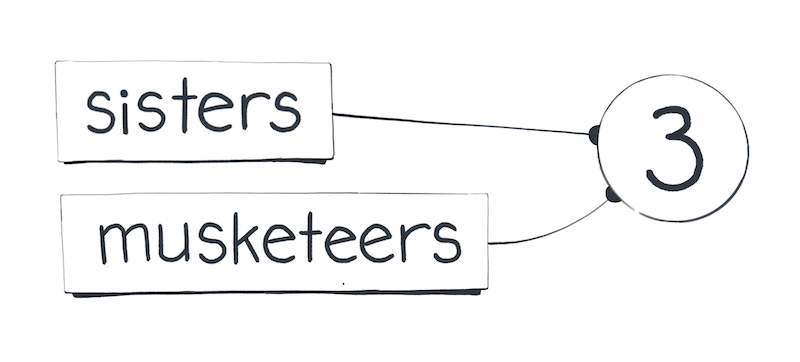
What makes objects different is that we can create more of them. Every time we use the {} object literal, we create a brand new object value:
let shrek = {};let donkey = {};
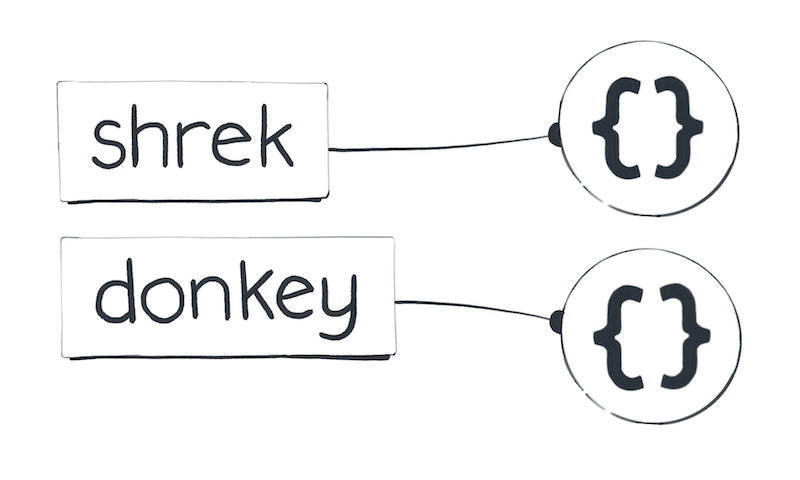
The same goes for arrays, dates, and any other objects. For example, the [] array literal creates a new array value—a value that never existed before.
Do Objects Disappear?
You might wonder: do objects ever disappear, or do they hang around forever? JavaScript is designed in a way that we can’t tell one way or the other from inside our code. For example, we can’t destroy an object:
let junk = {};junk = null; // Doesn't necessarily destroy an object
Instead, JavaScript is a garbage-collected language.
This means that although we can’t destroy an object, it might eventually “disappear” if there is no way to reach it by following the wires from our code.
JavaScript doesn’t offer guarantees about when garbage collection happens.
Unless you’re trying to figure out why an app is using too much memory, you don’t need to think about garbage collection too often. I only mention it here so that you know that we can create objects—but we cannot destroy them.
In our universe, objects and functions float closest to our code. This reminds us that we can manipulate them and even make more of them.
Functions
We’ve reached the last stop on our tour!
It is particularly strange to think about functions as values that are separate from my code. After all, they are my code. Or are they not?
Functions are Values
We define functions so that we can call them later and run the code inside them. However, to really understand functions in JavaScript, we need to forget about why they’re useful for a second. Instead, we will think about functions as yet another kind of value: a number, an object, a function.
To understand functions, we will compare them to numbers and objects.
First, consider this for loop that runs console.log(2) seven times:
for (let i = 0; i < 7; i++) {console.log(2);}
How many different values does it pass to console.log? To answer this, let’s recall what 2 means when we write it down. It is a number literal. A literal is an expression—a question to our universe. There is only one value for every number in our universe, so it “answers” our question by “summoning” the same value for the number 2 every time. So the answer is one value. We will see the log seven times—but we are passing the same value in each call.
Now let’s briefly revisit objects.
Here is another for loop that runs console.log({}) seven times:
for (let i = 0; i < 7; i++) {console.log({});}
How many different values does it pass to console.log now? Here, too, {} is a literal—except it’s an object literal. As we just learned, our JavaScript universe doesn’t “answer” an object literal by summoning anything. Instead, it creates a new object value—which will be the result of the {} object literal. So the code above creates and logs seven completely distinct object values.
Let that sink in.
Now have a look at functions.
for (let i = 0; i < 7; i++) {console.log(function() {});}
How many different values does this code pass to console.log?
The answer is seven.
Every time we execute a line of code that contains a function expression, a brand new function value appears in our universe.
Here, too, function() {} is an expression. Like any expression, a function expression is a “question” to our JavaScript universe—which answers us by creating a new function value every time we ask. This is very similar to how {} creates a new object value when it executes. Functions are like objects!
Technically, functions are objects in JavaScript. We’ll keep treating them as a separate fundamental type because they have unique capabilities compared to regular objects. But, generally speaking, if you can do something to an object, you can also do that to a function too. They are very special objects.
Calling a Function
What does this code print?
let countDwarves = function() { return 7; };let dwarves = countDwarves;console.log(dwarves);
You might think that it prints 7, especially if you’re not looking very closely.
Now check this snippet in the console! The exact thing it prints depends on the browser, but you will see the function itself instead of the number 7 there.
If you follow our mental model, this behavior should make sense:
- First, we created a new function value with a
function() { }expression, and pointed thecountDwarvesvariable at this value. - Next, we pointed the
dwarvesvariable at the value thatcountDwarvesis pointing to—which is the same function value. - Finally, we logged the value that
dwarvesis currently pointing to.
At no point did we call our function!
As a result, both countDwarves and dwarves point to the same value, which happens to be a function. See, functions are values. We can point variables to them, just like we can do with numbers or objects.
Of course, if we want to call a function, we can do that too:
let countDwarves = function() { return 7; };let dwarves = countDwarves(); // () is a function callconsole.log(dwarves);
Note that neither the let declaration nor the = assignment have anything to do with our function call. It’s () that performs the function call—and it alone!
Adding () changes the meaning of our code:
let dwarves = countDwarvesmeans “Pointdwarvesto the value thatcountDwarvesis currently pointing to.”let dwarves = countDwarves()means “Pointdwarvesto the value returned by the function thatcountDwarvesis currently pointing to.”
In fact, countDwarves() is also an expression. It’s known as a call expression. To “answer” a call expression, JavaScript runs the code inside our function, and hands us the returned value as the result (in this example, it’s 7).
Recap
That was quite a journey! Over the last two modules, we have looked at every value type in JavaScript. Let’s recap each type of value that we encountered, starting with the different primitive types:

- Undefined
- Null
- Booleans
- Numbers
- BigInts
- Strings
- Symbols
Then, there are the special types below, which let us make our own values:

- Objects
- Functions
It was fun to visit the different “celestial spheres” of JavaScript. Now that we’ve introduced ourselves to all the values, we’ve also learned what makes them distinct from one another.
Primitive values (strings, numbers, etc...), which we encountered in the first part of our tour, have always existed in our universe. For example, writing 2 or "hello" always “summons” the same number or a string value. Objects and functions behave differently and allow us to generate our own values. Writing {} or function() {} always creates a brand new, different value. This idea is crucial to understanding equality in JavaScript, which will be our next topic.
Exercises
This module also has exercises for you to practice!
Don’t skip them!
Even though you’re likely familiar with the concept of objects and functions, these exercises will help you cement the mental model we’re building. We need this foundation before we can get to more complex topics.