Equality of Values
episode 07It’s time to talk about equality in JavaScript! Here’s why it matters.
Imagine attending a masked carnival with only a few types of masks to choose from. Groups of people with the exact same outfit would be joking, dancing, and moving around the room. It would be confusing! You might talk to two people, and not realize that you really talked to the same person twice. Or you might think you talked to one person when, in reality, you talked to two different people!

If you don’t have a clear mental model of equality in JavaScript, every day is like a carnival—and not in a good way. You’re never quite sure if you’re dealing with the same value, or with two different values. As a result, you’ll often make mistakes—like changing a value you didn’t intend to change.
Luckily, we’ve already done most of the work to establish the concept of equality in JavaScript. It fits into our mental model in a very natural way.
Kinds of Equality
In JavaScript, there are several kinds of equality. If you’ve been writing JavaScript for a while, you’re probably familiar with at least two of them:
- Strict Equality:
a === b(triple equals). - Loose Equality:
a == b(double equals). - Same Value Equality:
Object.is(a, b).
Most tutorials don’t mention same value equality at all. We’ll take a road less traveled, and explain it first. We can then use it to explain the other kinds of equality.
Same Value Equality: Object.is(a, b)
In JavaScript, Object.is(a, b) tells us if a and b are the same value:
console.log(Object.is(2, 2)); // trueconsole.log(Object.is({}, {})); // false
This is called same value equality.
Despite Object in the method name, Object.is is not specific to objects. It can compare any two values, whether they are objects or not!
What does “same value” mean, exactly, in our mental model? You might already know this intuitively, but let’s verify your understanding.
Check Your Intuition
Consider this example from our earlier exercises:
let dwarves = 7;let continents = '7';let worldWonders = 3 + 4;
As a reminder, our sketch for this snippet looked like this:
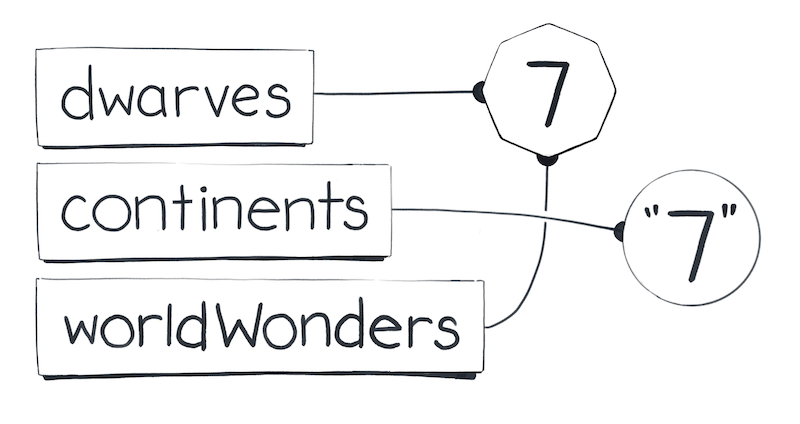
Now try to answer these questions using the diagram above:
console.log(Object.is(dwarves, continents)); // ?console.log(Object.is(continents, worldWonders)); // ?console.log(Object.is(worldWonders, dwarves)); // ?
Write down your answers and think about how you would explain them.
This was not a trick question! Here are the answers:
Object.is(dwarves, continents)isfalsebecausedwarvesandcontinentspoint to different values.Object.is(continents, worldWonders)isfalsebecausecontinentsandworldWonderspoint to different values.Object.is(worldWonders, dwarves)istruebecauseworldWondersanddwarvespoint to the same value.
If two values are represented by a single shape on our diagram, it means that they aren’t really two different values. They are the same value! In those instances, Object.is(a, b) returns true.
In the previous module, we explored the types of values in our JavaScript universe. As we got to know these values, we were learning what makes them distinct from one another. As a result, we also learned the opposite—what it means for values to be the same.
If you struggle with this idea, you might want to revisit our celestial tour of values and work through the exercises again. It will make sense, I promise!
But What About Objects?
By this point, you might be worried about objects. You might have heard that equality doesn’t work with objects, or that it compares “references.” If you have existing intuitions like these, set them aside completely for a moment.
Instead, look at this code snippet:
let banana = {};let cherry = banana;let chocolate = cherry;cherry = {};
Open a notepad or use the sketchpad below and draw a diagram of variables and values. You’ll want to draw it step by step, as it’s hard to do in your head.
Remember that {} always means “create a new object value.” Also, remember that = means “point the wire on the left side to the value on the right side.”
After you finish drawing, write down your answers to these questions:
console.log(Object.is(banana, cherry)); // ?console.log(Object.is(cherry, chocolate)); // ?console.log(Object.is(chocolate, banana)); // ?
Make sure to use your diagram to answer them.
Your drawing process should have followed these steps:
let banana = {};- Declare a
bananavariable. - Create a new object value
{}. - Point the
bananawire to it.
- Declare a
let cherry = banana;- Declare a
cherryvariable. - Point the
cherrywire to wherebananais pointing.
- Declare a
let chocolate = cherry;- Then, we declare a
chocolatevariable. - Point the
chocolatewire to wherecherryis pointing.
- Then, we declare a
cherry = {};- Create a new object value
{}. - Point the
cherrywire to it.
- Create a new object value
After the last step, your diagram should look like this:
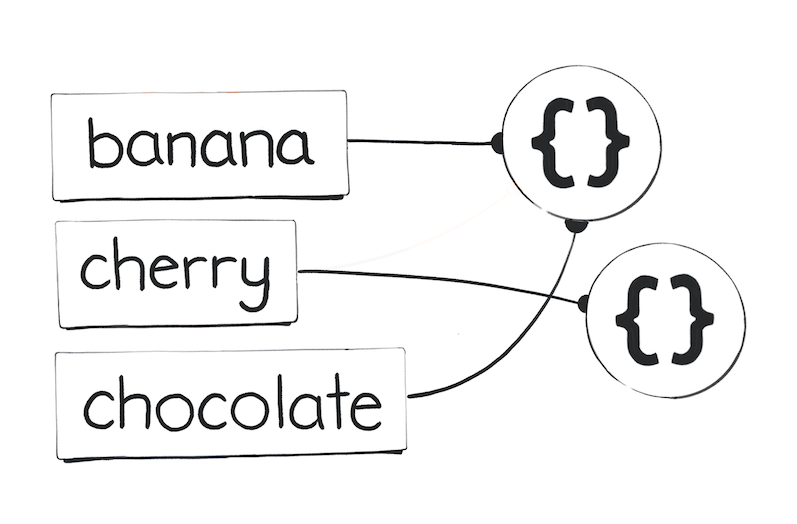
Now let’s check your answers:
Object.is(banana, cherry)isfalsebecausebananaandcherrypoint to different values.Object.is(cherry, chocolate)isfalsebecausecherryandchocolatepoint to different values.Object.is(chocolate, banana)istruebecausechocolateandbananapoint to the same value.
As you can see, we didn’t need any additional concepts to explain how same value equality works for objects. It comes naturally using our mental model. And that’s all there is to know about it!
Strict Equality: a === b
You have probably used the strict equality operator before:
console.log(2 === 2); // trueconsole.log({} === {}); // false
There is also a corresponding opposite !== operator.
Same Value Equality vs. Strict Equality
So what’s the difference between Object.is and ===?
Same value equality—Object.is(a, b)—has a direct meaning in our mental model. It corresponds to the idea of “the same value” in our universe.
In almost all cases, the same intuition works for strict value equality. For example, 2 === 2 is true because 2 always “summons” the same value:
Conversely, {} === {} is false because each {} creates a different value:
In the above examples, a === b behaves the same way as Object.is(a, b). However, there are two rare cases where the behavior of === is different.
Remember memorizing irregular verbs when you were learning English? The cases below are similar—consider them as exceptions to the rule.
Both of these unusual cases involve “special numbers” we discussed in the past:
NaN === NaNisfalse, although they are the same value.-0 === 0and0 === -0aretrue, although they are different values.
These cases are uncommon, but we’ll still take a closer look at them.
First Special Case: NaN
As we saw in our celestial tour of values, NaN is a special number that shows up when we do invalid math like 0 / 0:
let width = 0 / 0; // NaN
Further calculations with NaN will give you NaN again:
let height = width * 2; // NaN
You probably won’t do this intentionally, but it can happen if there is a flaw in your data or calculations.
Remember that NaN === NaN is always false:
console.log(width === height); // false
However, NaN is the same value as NaN:
console.log(Object.is(width, height)); // true
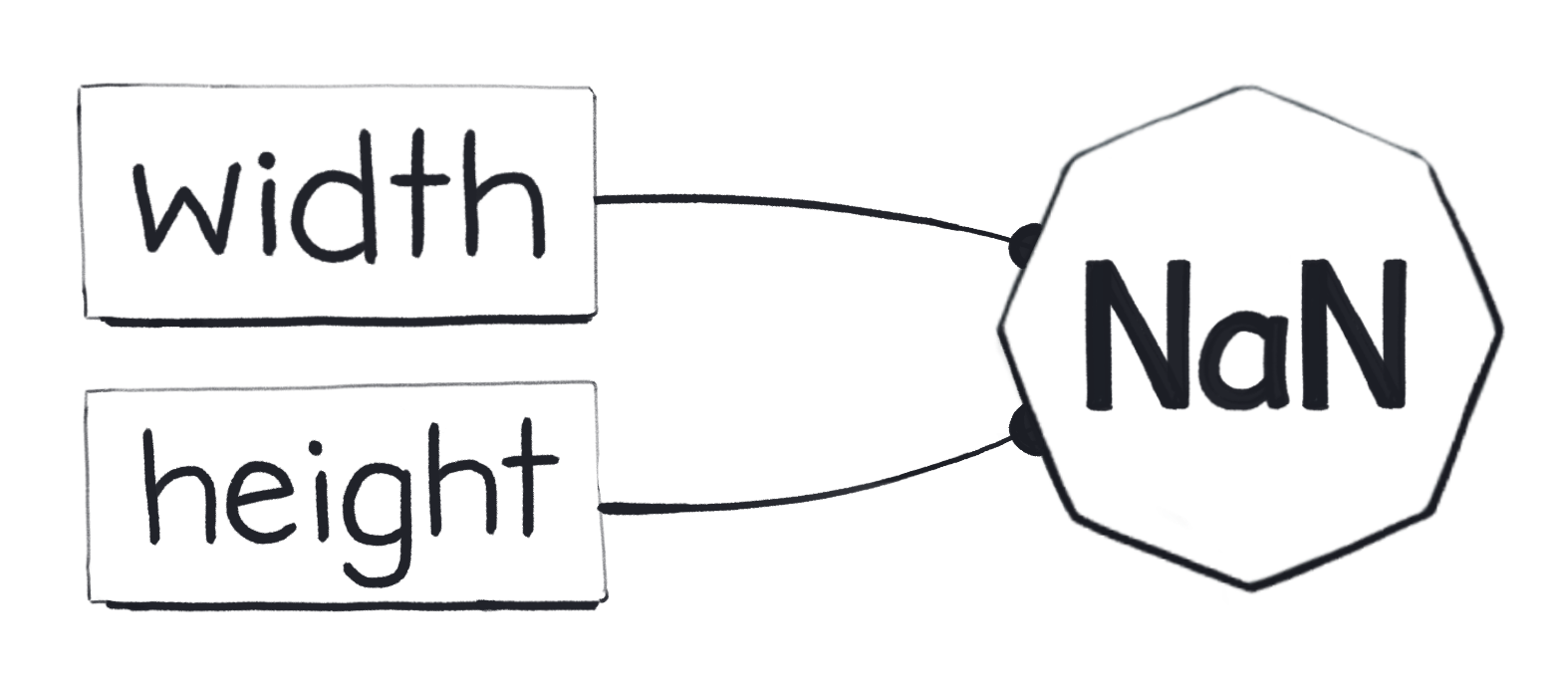
That’s confusing.
The reason for NaN === NaN being false is largely historical, so I suggest accepting it as a fact of life. You might run into this if you try to write some code that checks a value for being NaN (for example, to print a warning).
function resizeImage(size) {if (size === NaN) {// This will never get logged: the check is always false!console.log('Something is wrong.');}// ...}
Instead, here are a few ways (they all work!) to check if size is NaN:
Number.isNaN(size)Object.is(size, NaN)size !== size
The last one might be particularly surprising. Give it a few moments. If you don’t see how it detects NaN, try re-reading this section and thinking about it again.
size !== size works because NaN === NaN is false, as we already learned. So the reverse (NaN !== NaN) must be true.
Since NaN is the only value that’s not Strict Equal to itself, size !== size can only mean that size is NaN.
A quick historical anecdote: ensuring developers could detect NaN this way was one of the original reasons for making NaN === NaN return false! This was decided before JavaScript even existed.
Second Special Case: -0
In regular math, there is no such concept as “minus zero,” but it exists in floating-point math for practical reasons. Here’s an interesting fact about it.
Both 0 === -0 and -0 === 0 are always true:
let width = 0; // 0let height = -width; // -0console.log(width === height); // true
However, 0 is a different value from -0:
console.log(Object.is(width, height)); // false
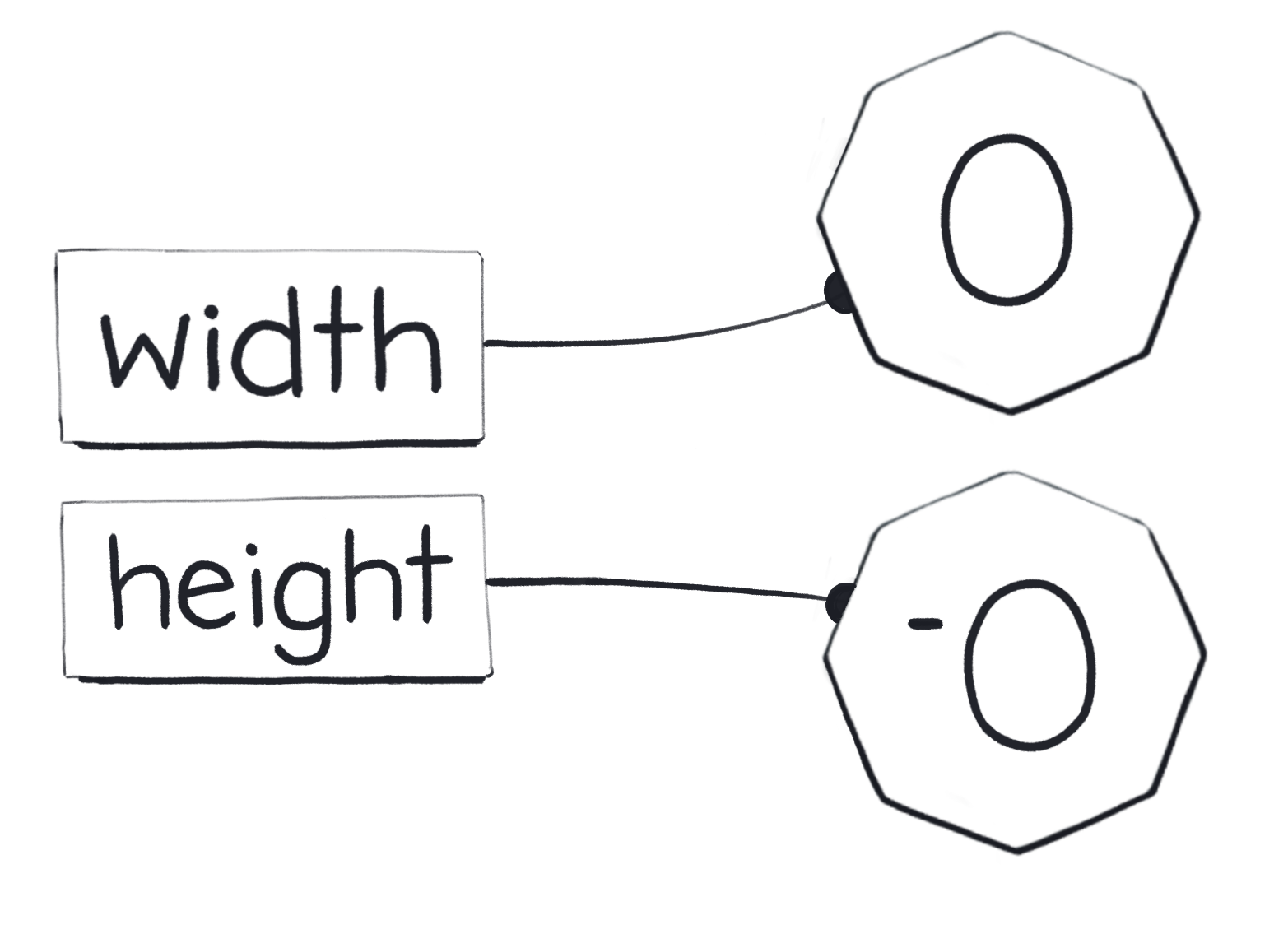
That’s confusing too.
In practice, I haven’t run into a case where this matters in my entire career.
Coding Exercise
Now that you know how Object.is and === work, I have a small coding exercise for you. You don’t have to complete it, but it’s a fun brainteaser.
Write a function called strictEquals(a, b) that returns the same value as a === b. Your implementation must not use the === or !== operators.
Here is my answer if you want to check yourself. This function is utterly useless, but writing it helps make sense of ===.
Don’t Panic
Hearing about these special numbers and how they behave can be overwhelming. Don’t stress too much about these special cases!
They’re not very common. Now that you know they exist, you will recognize them in practice. In most cases, we can trust our “equality intuition” for both Object.is(a, b) and a === b.
Loose Equality
Finally, we get to the last kind of equality.
Loose equality (double equals) is the bogeyman of JavaScript. Here are a couple of examples to make your skin crawl:
console.log([[]] == ''); // trueconsole.log(true == [1]); // trueconsole.log(false == [0]); // true
The rules of loose equality (also called “abstract equality”) are arcane and confusing. Many coding standards prohibit the use of == and != in code altogether.
Although Just JavaScript doesn’t take strong opinions on what features you should or shouldn’t use, we’re not going to cover loose equality in much detail. It’s uncommon in modern codebases, and its rules don’t play a larger role in the language—or in our mental model.
The rules of loose equality are widely acknowledged as an early bad design decision of JavaScript, but if you are still curious, you can check out how it works here. Don’t feel pressured to memorize it—you’ll need that memory for other topics!
The one relatively common use case worth knowing is:
if (x == null) {// ...}
This code is equivalent to writing:
if (x === null || x === undefined) {// ...}
However, even that usage of == might be controversial on some teams. It’s best to discuss how much == is tolerated in your codebase as a team before using it.
Recap
- JavaScript has several kinds of equality. They include same value equality, strict equality, and loose equality.
- Same value equality, or
Object.is(a, b), matches the concept of the sameness of values that we introduced in the previous module.- Understanding this kind of equality helps prevent bugs! You will often need to know when you’re dealing with the same value, and when you’re dealing with two different values.
- When we draw a diagram of values and variables, the same value cannot appear twice.
Object.is(a, b)istruewhen variablesaandbpoint to the same value on our diagram. - Same value equality is verbose and a bit annoying to write, but it's also the easiest to explain, which is why we started with it.
- In practice, you will use strict equality, or
a === b, most often. It is equivalent to the same value equality except for two rare special cases:NaN === NaNisfalse, even though they are the same value.0 === -0and-0 === 0istrue, but they are different values.
- You can check whether
xisNaNusingNumber.isNaN(x). - Loose equality (
==) uses a set of arcane rules and is often avoided.
Exercises
This module also has exercises for you to practice!
Don’t skip them!
Even though you’re likely familiar with the concept of equality, these exercises will help you cement the mental model we’re building. We need this foundation before we can get to more complex topics.