Properties
episode 08Meet Sherlock Holmes, a world-renowned detective from London:
let sherlock = {surname: 'Holmes',address: { city: 'London' }};
His friend, John Watson, recently moved in:
let john = {surname: 'Watson',address: sherlock.address};
Sherlock is a brilliant detective, but a difficult flatmate. One day, John decides he’s had enough—he changes his surname and moves to Malibu:
john.surname = 'Lennon';john.address.city = 'Malibu';
Time for a small exercise. Write down your answers to these questions:
console.log(sherlock.surname); // ?console.log(sherlock.address.city); // ?console.log(john.surname); // ?console.log(john.address.city); // ?
Before re-reading the code, I want you to approach these questions in a particular way. Use a sketchpad or get paper and a pen, and sketch out your mental model of what happens on every line. It’s okay if you’re not sure how to represent it. We haven’t yet discussed these topics, so use your best guess.
Then, with the help of your final sketch, answer the four questions above.
Now let’s check your answers:
console.log(sherlock.surname); // "Holmes"console.log(sherlock.address.city); // "Malibu"console.log(john.surname); // "Lennon"console.log(john.address.city); // "Malibu"
This is not a typo—they are indeed both in Malibu. It’s not so easy to get away from Sherlock! With an inaccurate mental model, one might conclude that sherlock.address.city is "London"—but it’s not.
To see why, we need to learn how properties work in our JavaScript universe.
Properties
We’ve talked about objects before. For example, here is a sherlock variable pointing to an object value. We create a new object value by writing {}:
let sherlock = {};
In our universe, it might look like this:

However, objects are primarily useful to group related data together. For example, we might want to group different facts about Sherlock:
let sherlock = {surname: 'Holmes',age: 64,};
Here, sherlock is still a variable, but surname and age are not. They are properties. Unlike variables, properties belong to a particular object.
In our JavaScript universe, both variables and properties act like “wires.” However, the wires of properties start from objects rather than from our code:
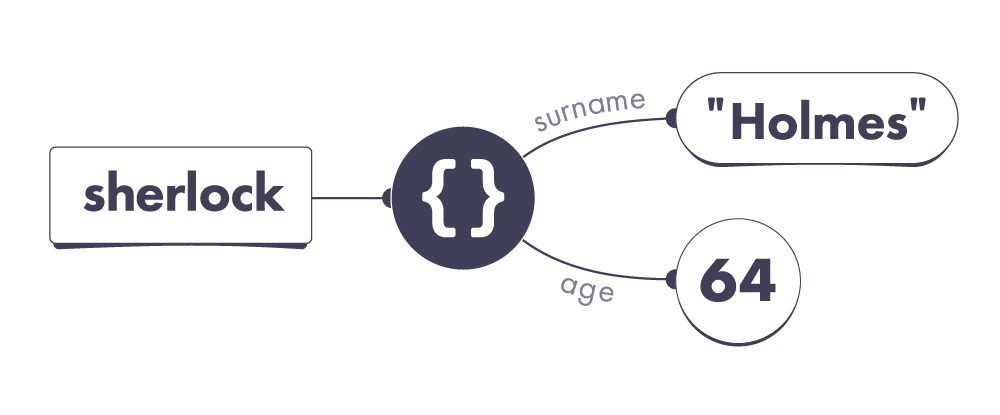
Here, we can see that the sherlock variable points to an object we have created. That object has two properties. Its surname property points to the "Holmes" string value, and its age property points to the 64 number value.
Importantly, properties don’t contain values—they point to them! Remember that our universe is full of wires. Some of them start from our code (variables), and others start from objects (properties). All wires always point to values.
Before reading this, you might have imagined that values live “inside” objects because they appear “inside” in code. This intuition often leads to mistakes, so we will be “thinking in wires” instead. Take one more look at the code and the diagram. Make sure you’re comfortable with them before you continue.
Reading a Property
We can read a property’s current value by using the “dot notation”:
console.log(sherlock.age); // 64
Here, sherlock.age is our old friend, an expression—a question to our JavaScript universe. To answer it, JavaScript first follows the sherlock wire:
It leads to an object. From that object, JavaScript follows the age property.
Our object’s age property points to 64, so sherlock.age results in 64.
Property Names
One important thing to keep in mind when naming a property is that a single object can’t have two properties with the same name. For example, our object can’t have two properties called age.
Property names are also always case-sensitive! For example, age and Age would be two completely different properties from JavaScript’s point of view.
If we don’t know a property name ahead of time, but we have it in code as a string value, we can use the [] “bracket notation” to read it from an object:
let sherlock = { surname: 'Holmes', age: 64 };let propertyName = prompt('What do you want to know?');alert(sherlock[propertyName]); // Read property by its name
Try this code in your browser console and enter age when prompted.
Assigning to a Property
What happens when we assign a value to a property?
sherlock.age = 65;
Let’s split this code into the left and the right side, separated by =.
First, we figure out which wire is on the left side: sherlock.age.
We follow the sherlock wire, and then pick the age property wire:
Note that we don’t follow the age wire to 64. We don’t care what its current value is. On the left side of the assignment, we are looking for the wire itself.
Remember which wire we picked? Carry on.
Next, we figure out which value is on the right side: 65.
Unlike the left side, the right side of an assignment always expresses a value. In this example, the right side’s value is the number value 65. Let’s summon it:
Now we are ready to perform the assignment.
At last, we point the wire on the left side to the value on the right side:
And we’re done! From now on, reading sherlock.age would give us 65.
Missing Properties
You might wonder what happens if we read a property that doesn’t exist:
let sherlock = { surname: 'Holmes', age: 64 };console.log(sherlock.boat); // ?
We know that sherlock.boat is a property expression, but how does our JavaScript universe decide which value to “answer” us with?
JavaScript uses a set of rules that looks something like this:
- Figure out the value of the part before the dot (
.). - If that value is
nullorundefined, throw an error immediately. - Check whether a property with that name exists on our object:
a. If it exists, answer with the value this property points to.
b. If it doesn’t exist, answer with theundefinedvalue.
These rules are a bit simplified, but they already tell us a lot about how JavaScript works! For example, sherlock points to an object that doesn’t have a boat property. So sherlock.boat gives us undefined as an answer:
let sherlock = { surname: 'Holmes', age: 64 };console.log(sherlock.boat); // undefined
Note this does not mean that our object has a boat property pointing to undefined! It only has two properties, and neither of them is called boat:
It is tempting to think sherlock.boat directly corresponds to the concept of a property in our mental model, but that’s not quite correct. It is a question—and so JavaScript follows the rules to answer it.
It looks at the object that sherlock points to, sees that it doesn’t have a boat property, and gives us back the undefined value because that’s what the rules say. There is no deeper reason for this: computers follow the rules.
Fundamentally, it’s because every expression needs to result in some value, or throw an error. Some other languages throw an error if you access a property that doesn’t exist—but JavaScript is not one of them!
Scroll up and re-read the rules again. Can you apply them in practice?
let sherlock = { surname: 'Holmes', age: 64 };console.log(sherlock.boat.name); // ?
What happens if we run this code? Don’t guess—follow the rules.
Hint: there are two dots, so you need to follow the rules two times.
The answer is that calculating sherlock.boat.name throws an error:
- We need to first figure out the value of
sherlock.boat.- To do that, we need to figure out the value of
sherlock.- The
sherlockvariable points to an object. - Therefore, the value of
sherlockis that object.
- The
- An object is not
nullorundefined, so we keep going. - That object does not have a
boatproperty. - Therefore, the value of
sherlock.boatisundefined.
- To do that, we need to figure out the value of
- We’ve got
undefinedon the left side of the dot (.). - The rules say that
nullorundefinedon the left side is an error.
let sherlock = { surname: 'Holmes', age: 64 };console.log(sherlock.boat); // undefinedconsole.log(sherlock.boat.name); // TypeError!
If this still seems confusing, scroll up and mechanically follow the rules.
Recap
- Properties are wires—a bit like variables. They both point to values. Unlike variables, properties start from objects in our universe.
- Properties belong to particular objects. You can’t have more than one property with the same name on an object.
- Generally, you can perform an assignment in three steps:
- Figure out which wire is on the left.
- Figure out which value is on the right.
- Point that wire to that value.
- An expression like
obj.propertyis calculated in three steps:- Figure out which value is on the left.
- If it’s
nullorundefined, throw an error. - If that property exists, the result is the value it points to. If that property doesn’t exist, the result is
undefined.
Note that this mental model of properties is still a bit simplified. It is good enough for now, but it will need to expand as you learn more about the JavaScript universe.
If you got confused by the Sherlock Holmes example in the beginning, try walking through it again using our new mental model and focusing on properties as wires. The next module will include a detailed walkthrough in case you’re still not quite sure why it works this way.
Exercises
This module also has exercises for you to practice!
Don’t skip them!
Even though you’re likely familiar with the concept of properties and assignment, these exercises will help you cement the mental model we’re building. We need this foundation before we can get to more complex topics.