Mutation
episode 09In the previous module about properties, we introduced the mystery of Sherlock Holmes moving to Malibu, but we haven’t explained it yet.
This time, we will walk through the code step-by-step and draw our diagrams together so you can check your mental model.
Step 1: Declaring the sherlock Variable
We start with this variable declaration:
let sherlock = {surname: 'Holmes',address: { city: 'London' }};
Draw the diagram for this step now:
Your diagram should end up looking like this:
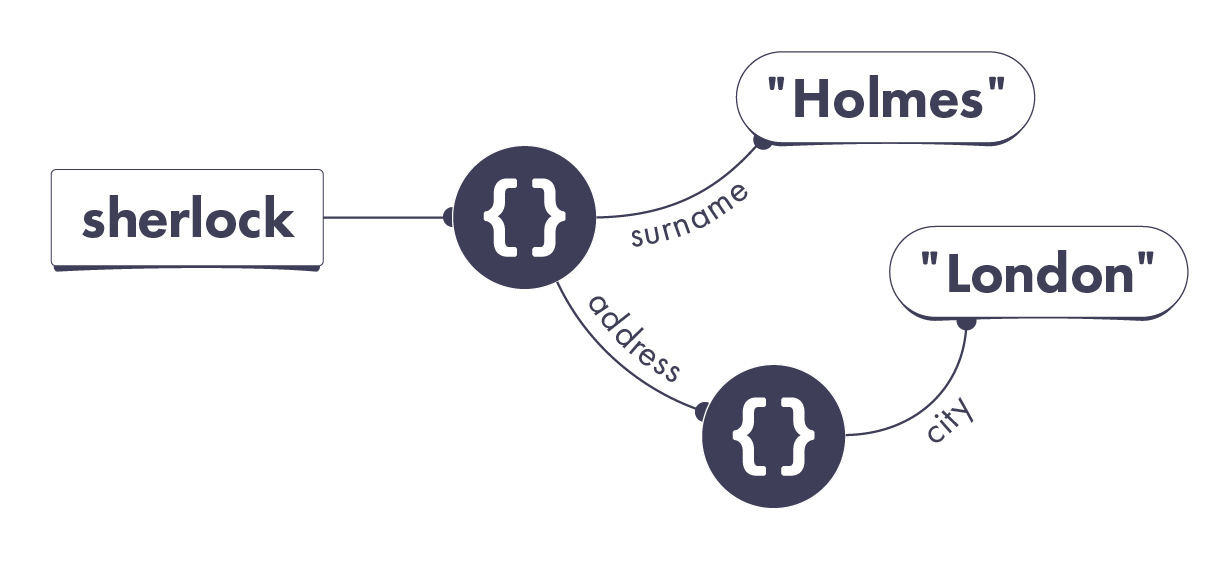
There is a sherlock variable pointing to an object. That object has two properties. Its surname property points to the "Holmes" string value. Its address property points to another object. That other object only has one property called city. That property points to the "London" string value.
Take a close look at my process for drawing this diagram:
Was your process similar?
No Nested Objects
Notice that we have not one, but two completely separate objects here. Two pairs of curly braces mean two objects.
Objects might appear “nested” in code, but in our universe, each object is completely separate. An object cannot be “inside” of another object! If you have been visualizing nested objects, now is the time to change your mental model.
Step 2: Declaring the john Variable
In this step, we declare another variable:
let john = {surname: 'Watson',address: sherlock.address};
Edit the diagram you drew earlier to reflect these changes.
Your additions to the diagram should look like this:
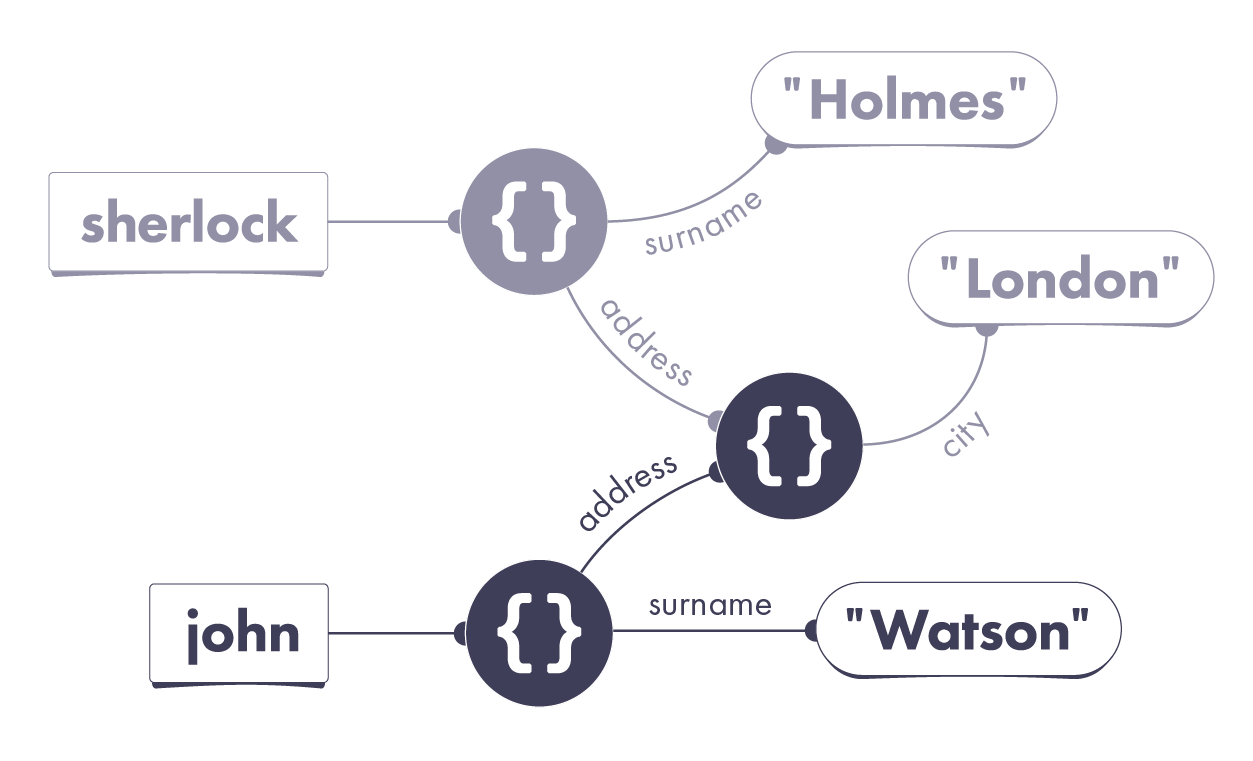
There is a new john variable. It points to an object with two properties:
- Its
addressproperty points to the same object thatsherlock.addressis already pointing to. - Its
surnameproperty points to the"Watson"string value.
Take a look at my process in more detail:
Did you do anything differently?
Properties Always Point to Values
When you see address: sherlock.address, it is tempting to think that John’s address property points to Sherlock’s address property.
This is misleading.
Remember: a property always points to a value! It can’t point to another property or a variable. In general, all wires in our universe point to values.
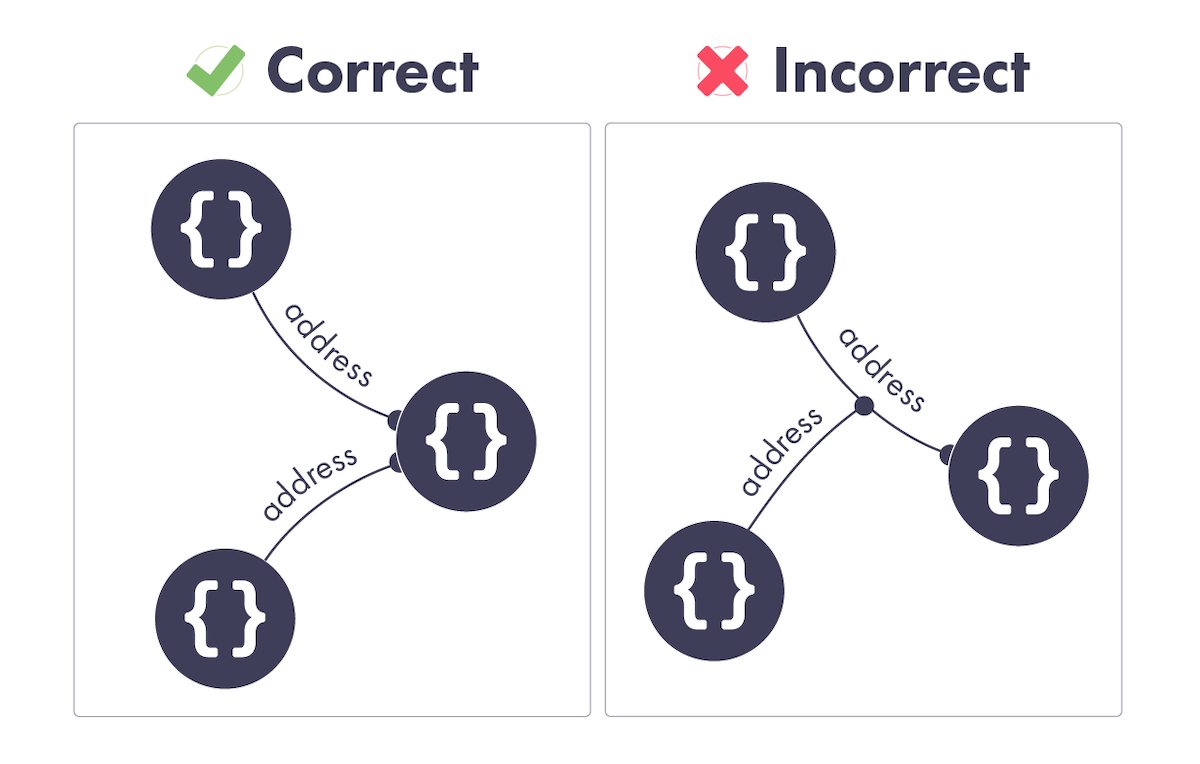
When we see address: sherlock.address, we must figure out the value of sherlock.address, and point John’s address property wire to that value.
It’s the value itself (the object previously created with { city: 'London' }) that matters during the assignment, not how we found it (sherlock.address).
As a result, there are now two different address properties pointing to the same object. Can you spot them both on the diagram?
Step 3: Changing the Properties
Now—if you recall the last step of our example—John has an identity crisis, and gets sick of the London drizzle. He decides to change his name and move to Malibu. We do this by setting a few properties:
john.surname = 'Lennon';john.address.city = 'Malibu';
How do we change the diagram to reflect it?
Your diagram should now look like this:
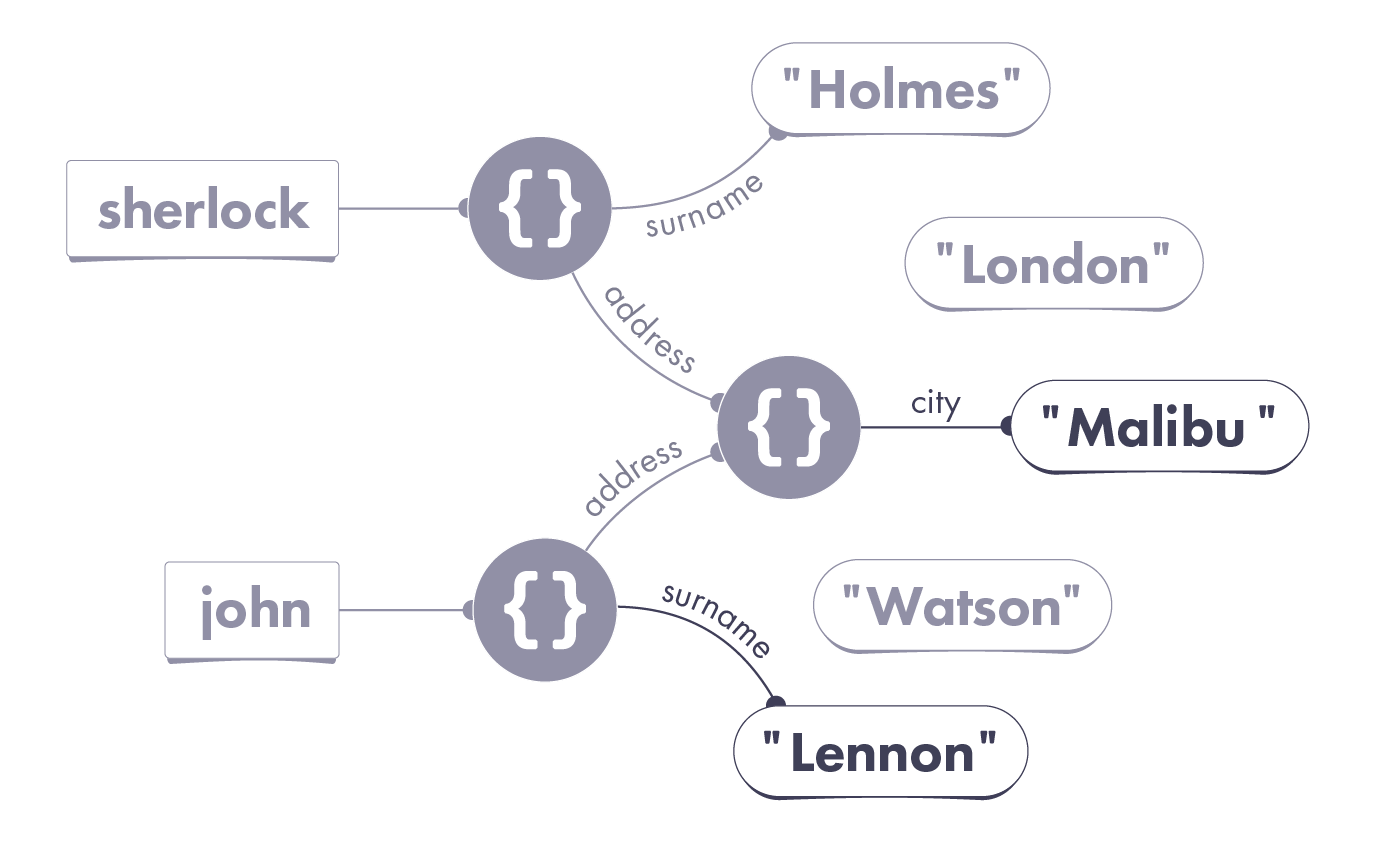
John’s surname property now points at the "Lennon" string value. More interestingly, the object that both address properties are pointing to has changed. Its city property now points to the "Malibu" string value.
In a strange case of location hijacking, both Sherlock and John have ended up in Malibu. Follow the wires using the diagram and verify this:
console.log(sherlock.surname); // "Holmes"console.log(sherlock.address.city); // "Malibu"console.log(john.surname); // "Lennon"console.log(john.address.city); // "Malibu"
Here is my process for the last series of changes:
We figure out the wire, then the value, and point the wire to that value.
The result should make sense now, but this example is confusing on a deeper level. Where is the mistake in it? How do we actually fix the code so that John moves to Malibu alone? To make sense of it, we need to talk about mutation.
Mutation
Mutation is a fancy way of saying “change.”
For example, we could say that we changed an object’s property, or we could say that we mutated that object (and its property). This is the same thing.
People like to say “mutate” because this word has a sinister undertone. It reminds you to exercise extra caution. This doesn’t mean mutation is “bad”—it’s just programming!—but you need to be very intentional about it.
Let’s recall our original task. We wanted to give John a different surname, and move him to Malibu. Now let’s look at our two mutations:
// Step 3: Changing the Propertiesjohn.surname = 'Lennon';john.address.city = 'Malibu';
Which objects are being mutated here?
The first line mutates the object john points to. This makes sense: we mean to change John’s surname. That object represents John’s data, so we mutate its surname property.
However, the second line does something very different. It doesn’t mutate the object that john points to. Rather, it mutates a completely different object—the one we can reach via john.address. And if we look at the diagram, we know we’ll reach the same object via sherlock.address!
By mutating an object used elsewhere in the program, we’ve made a mess.
This is why the intuition of objects being “nested” is so wrong! It makes us forget that there may be many objects pointing to the object we changed.
Possible Solution: Mutating Another Object
One way to fix this would be to avoid mutating shared data:
// Replace Step 3 with this code:john.surname = 'Lennon';john.address = { city: 'Malibu' };
The difference in the second line is subtle, but very important.
With john.address.city = "Malibu", we are mutating the city property of the object that john.address points to. Because john.address and sherlock.address point to the same object, we unintentionally mutated shared data.
With john.address = { city: 'Malibu' }, we are mutating the address property of the object that john points to. In other words, we are only mutating the object representing John’s data. This is why sherlock.address.city remains unchanged:
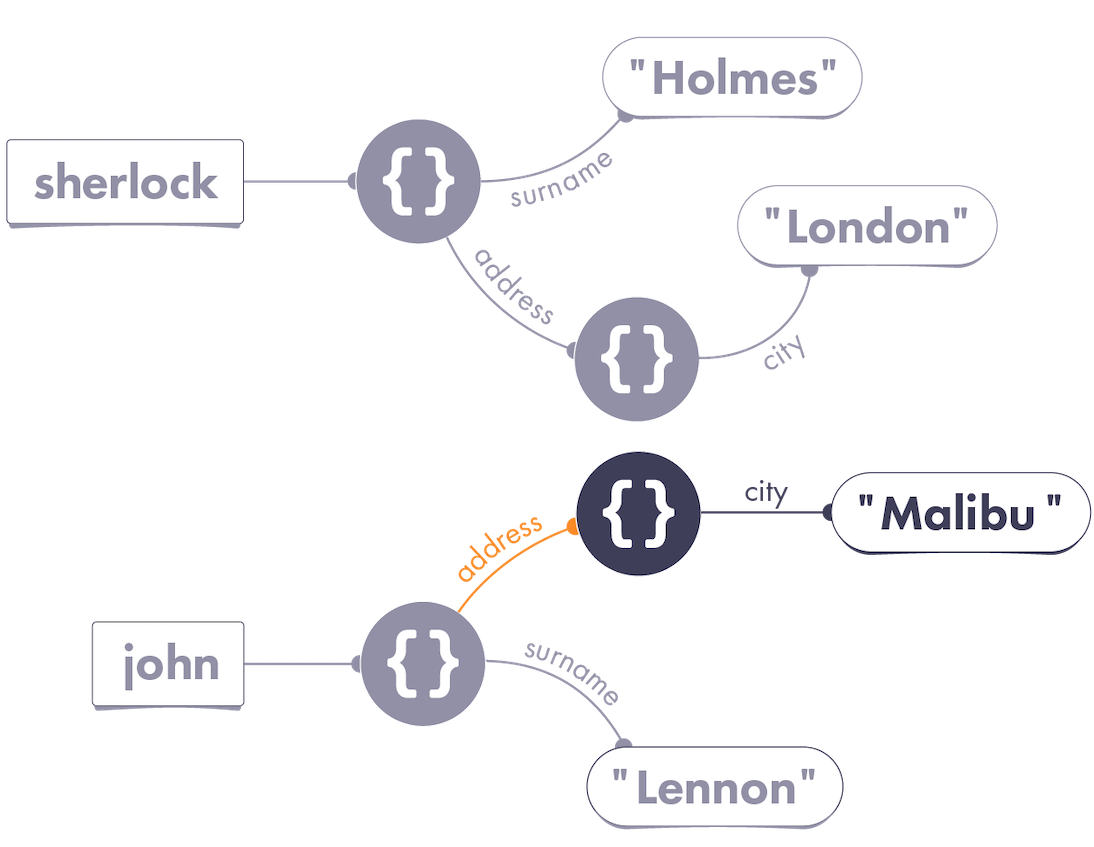
As you can see, visually similar code may produce very different results. Always pay attention to the wires!
Alternative Solution: No Object Mutation
There is another way we can make john.address.city give us "Malibu" while sherlock.address.city continues to say "London":
// Replace Step 3 with this code:john = {surname: 'Lennon',address: { city: 'Malibu' }};
Here, we don’t mutate John’s object at all. Instead, we reassign the john variable to point to a “new version” of John’s data. From now on, john points to a different object, whose address also points to a completely new object:
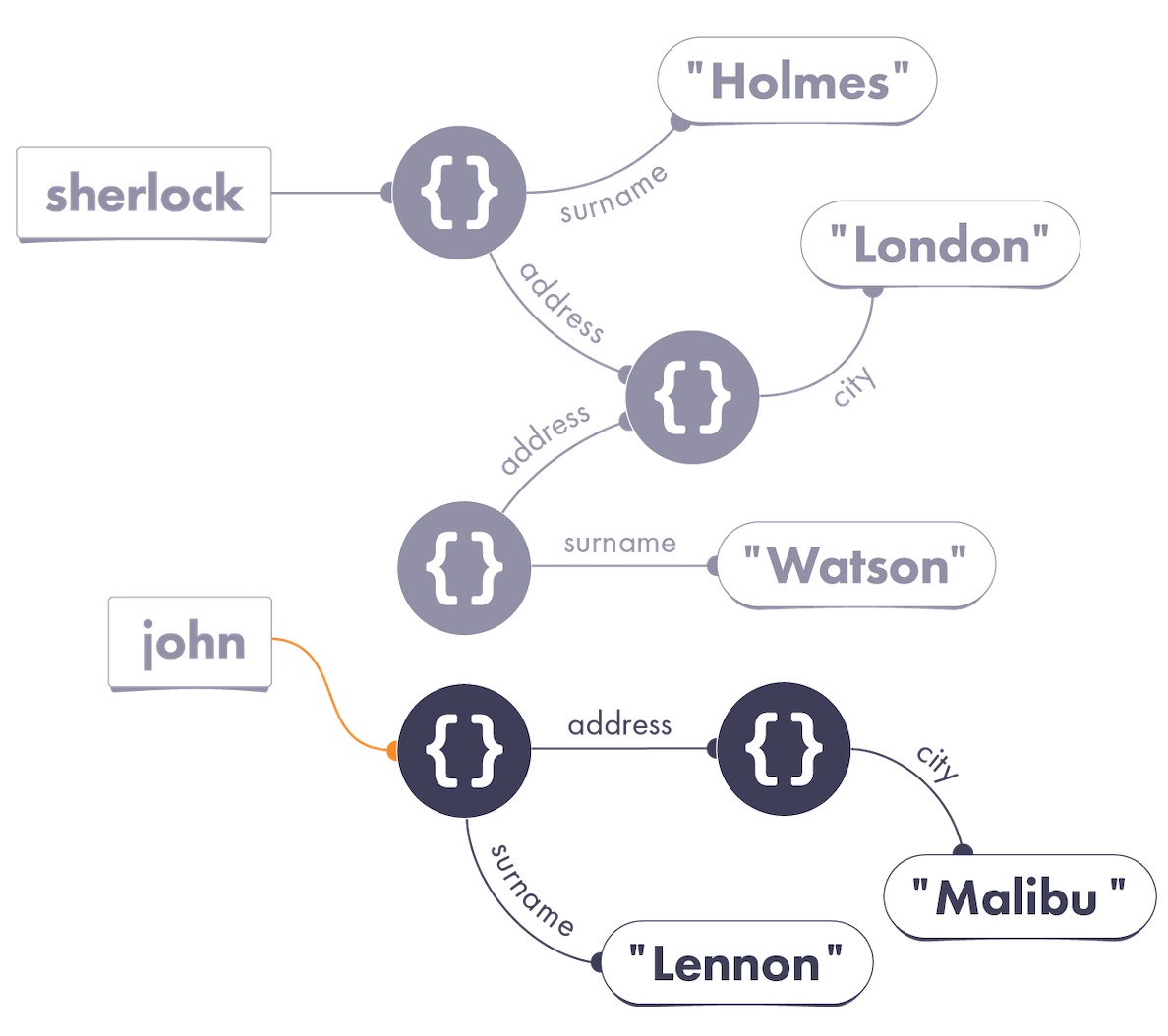
You might notice there’s now an “abandoned” old version of the John object on our diagram. We don’t need to worry about it. JavaScript will eventually automatically remove it from memory if there are no wires pointing to it.
Note that both of these approaches satisfy all of our requirements:
console.log(sherlock.surname); // "Holmes"console.log(sherlock.address.city); // "London"console.log(john.surname); // "Lennon"console.log(john.address.city); // "Malibu"
Compare their diagrams. Do you have a personal preference for either of these fixes? What are, in your opinion, their advantages and disadvantages?
Learn From Sherlock
Sherlock Holmes once said, “When you have eliminated the impossible, whatever remains, however improbable, must be the truth.”
As your mental model becomes more complete, you will find it easier to debug problems because you will know what possible causes to look for.
For example, if you know that sherlock.address.city has changed after running some code, the wires from our diagram suggest three explanations:

- Maybe the
sherlockvariable was reassigned. - Maybe the object we could reach via
sherlockwas mutated, and itsaddressproperty was set to something different. - Maybe the object we could reach via
sherlock.addresswas mutated, and itscityproperty was set to something different.
Your mental model gives you a starting point from which you can investigate bugs. This works the other way around too. Sometimes, you can tell a piece of code is not the source of a problem—because the mental model proves it!
Say, if we point the john variable to a different object, we can be fairly sure that sherlock.address.city won’t change. Our diagram shows that changing the john wire doesn’t affect any wires coming from sherlock:
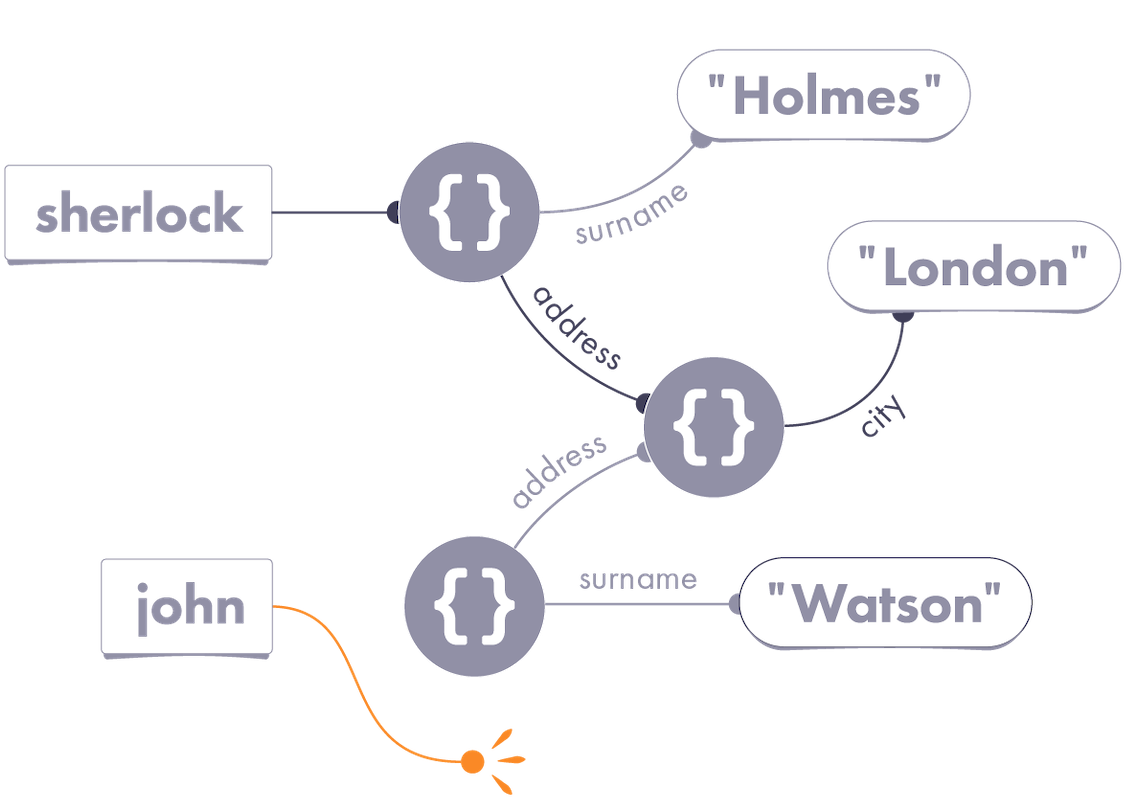
Still, keep in mind that unless you’re Sherlock Holmes, you can rarely be fully confident in something. This approach is only as good as your mental model! Mental models will help you come up with theories, but you need to confirm them with console.log or a debugger.
Let vs. Const
It is worth noting you can use the const keyword as an alternative to let:
const shrek = { species: 'ogre' };
The const keyword lets you create read-only variables—also known as constants. Once we declare a constant, we can’t point it to a different value:
shrek = fiona; // TypeError
But there’s a crucial nuance. We can still mutate the object our wire points to:
shrek.species = 'human';console.log(shrek.species); // 'human'
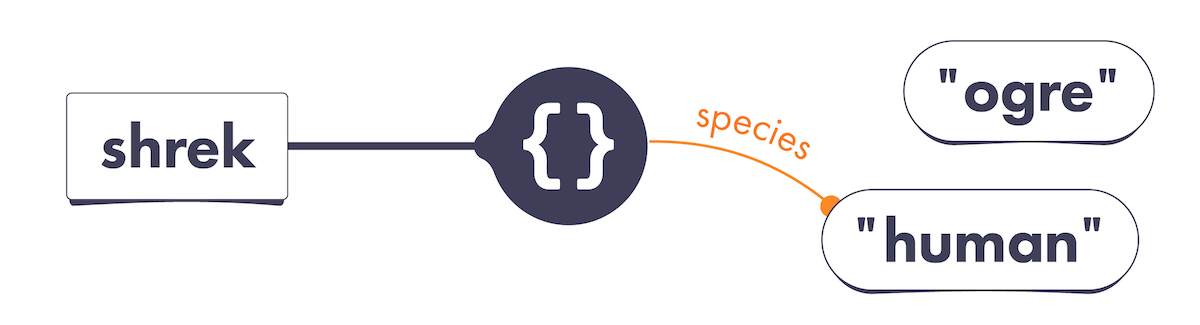
In this example, it is only the shrek variable wire itself that is read-only (const). It points to an object—and that object’s properties can be mutated!
The usefulness of const is a hotly debated topic. Some prefer to ban let altogether and always use const. Others say that programmers should be trusted to reassign their own variables. Whatever your preference may be, remember that const prevents variable reassignment—not object mutation.
Is Mutation Bad?
Don’t walk away thinking that mutation is “bad.” That’s a lazy oversimplification that obscures real understanding. If data changes over time, a mutation happens somewhere. The question is, what should be mutated, where, and when?
Mutation is “spooky action at a distance.” Changing john.address.city led to console.log(sherlock.address.city) printing something else.
By the time you mutate an object, variables and properties may already be pointing to it. Your mutation affects any code “following” those wires later.
This is both a blessing and a curse. Mutation makes it easy to change some data and immediately “see” the change across the whole program. However, undisciplined mutation makes it harder to predict what the program will do.
There is a school of thought that mutation is best contained to a very narrow layer of your application. The benefit, according to this philosophy, is that your program’s behavior is more predictable. The downside is that you write more code to “pass things around” and avoid mutation.
It’s worth noting that mutating new objects that you’ve just created is always okay because there are no other wires pointing to them yet. In other cases, I advise you to be very intentional about what you’re mutating and when. The extent to which you’ll rely on mutation depends on your app’s architecture.
Recap
- Objects are never “nested” in our universe—pay close attention to the wires.
- Changing an object’s property is also called mutating that object.
- If you mutate an object, your code will “see” that change via any wires pointing to that object. Sometimes, this may be what you want. However, mutating accidentally shared data may cause bugs.
- You can declare a variable with
constinstead oflet. That allows you to enforce that this variable always points to the same value. But remember thatconstdoes not prevent object mutation! - Mutating the objects you’ve just created in code is safe. Broadly, how much you’ll use mutation depends on your app’s architecture.
Exercises
This module also has exercises for you to practice!
Don’t skip them!
Even though you’re likely familiar with the concept of mutation, these exercises will help you cement the mental model we’re building. We need this foundation before we can get to more complex topics.