Prototypes
episode 10In previous modules, we’ve covered object properties and mutation, but we’re not quite done—we still need to talk about prototypes!
Here is a small riddle to check our mental model:
let pizza = {};console.log(pizza.taste); // "pineapple"
Ask yourself: is this possible?
We have just created an empty object with {}. We definitely didn’t set any properties on it before logging, so it seems like pizza.taste can’t point to "pineapple". We would expect pizza.taste to give us undefined instead—we usually get undefined when a property doesn’t exist, right?
And yet, it is possible that pizza.taste is "pineapple"! This may be a contrived example, but it shows that our mental model is incomplete.
In this module, we’ll introduce prototypes. Prototypes explain what happens in this puzzle and—more importantly—are at the heart of several other fundamental JavaScript features. Occasionally people neglect to learn about prototypes because they seem too unusual, but the core idea is remarkably simple.
Prototypes
Here’s a couple of variables pointing to a couple of objects:
let human = {teeth: 32};let gwen = {age: 19};
We can represent them visually in a familiar way:
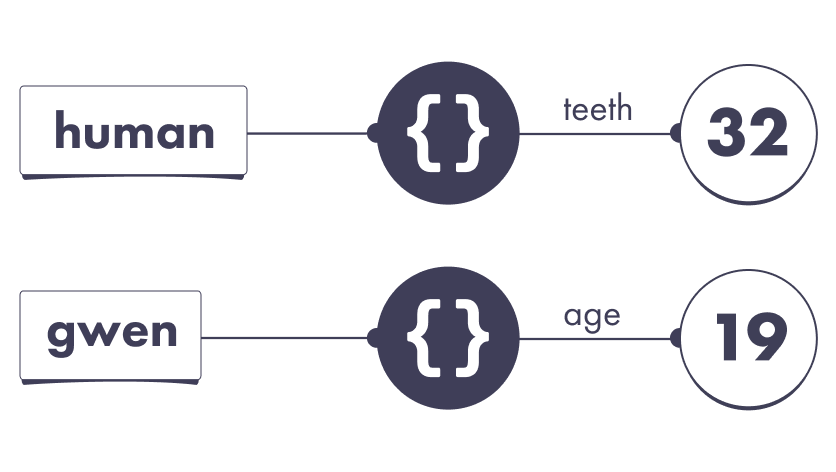
In this example, gwen points to an object without a teeth property. According to the rules we’ve learned, logging this property would give us undefined:
console.log(gwen.teeth); // undefined
But the story doesn’t have to end here. JavaScript’s default behavior returns undefined, but we can instruct it to continue searching for our missing property on another object. We can do it with one line of code:
let human = {teeth: 32};let gwen = {// We added this line:__proto__: human,age: 19};
What is that mysterious __proto__ property?
It represents the JavaScript concept of a prototype. Any JavaScript object may choose another object as a prototype. We will discuss what that means in practice but for now, let’s think of it as a special __proto__ wire:

Take a moment to verify the diagram matches the code. We drew it just like we did in the past. The only new thing is the mysterious __proto__ wire.
By specifying __proto__ (also known as our object’s prototype), we instruct JavaScript to continue looking for missing properties on that object instead.
Prototypes in Action
When we went looking for gwen.teeth, we got undefined because the teeth property doesn’t exist on the object that gwen points to.
But thanks to __proto__: human, the answer is different:
let human = {teeth: 32};let gwen = {// "Look for other properties here"__proto__: human,age: 19};console.log(gwen.teeth); // 32
Now the sequence of steps looks like this:
- Follow the
gwenwire. It leads to an object. - Does this object have a
teethproperty?- No.
- But it has a prototype. Let’s check it out.
- Does that object have a
teethproperty?- Yes, it points to
32. - Therefore, the result of
gwen.teethis32.
- Yes, it points to
This is similar to saying, “I don’t know, but Alice might know.” With __proto__, you instruct JavaScript to “ask another object.”
To check your understanding so far, write down your answers:
let human = {teeth: 32};let gwen = {__proto__: human,age: 19};console.log(human.age); // ?console.log(gwen.age); // ?console.log(human.teeth); // ?console.log(gwen.teeth); // ?console.log(human.tail); // ?console.log(gwen.tail); // ?
Now let’s check your answers.
The human variable points to an object that doesn’t have an age property, so human.age is undefined. The gwen variable points to an object that does have an age property. That wire points to 19, so the value of gwen.age is 19:
console.log(human.age); // undefinedconsole.log(gwen.age); // 19
The human variable points to an object that has a teeth property, so the value of human.teeth is 32. The gwen variable points to an object that doesn’t have a teeth property. However, that object has a prototype, which does have a teeth property. This is why the value of gwen.teeth is also 32.
console.log(human.teeth); // 32console.log(gwen.teeth); // 32
Neither of our objects has a tail property, so we get undefined for both:
console.log(human.tail); // undefinedconsole.log(gwen.tail); // undefined
Note how although the value of gwen.teeth is 32, it doesn’t mean gwen has a teeth property! Indeed, in this example, the object that gwen points to does not have a teeth property. But its prototype object—the same one human points to—does.
This serves to remind us that gwen.teeth is an expression—a question to our JavaScript universe—and JavaScript will follow a sequence of steps to answer it. Now we know these steps involve looking at the prototype.
The Prototype Chain
A prototype isn’t a special “thing” in JavaScript. A prototype is more like a relationship. An object may point to another object as its prototype.
This naturally leads to a question: but what if my object’s prototype has its own prototype? And that prototype has its own prototype? Would that work?
The answer is yes—this is exactly how it works!
let mammal = {brainy: true,};let human = {__proto__: mammal,teeth: 32};let gwen = {__proto__: human,age: 19};console.log(gwen.brainy); // true
We can see that JavaScript will search for the property on our object, then on its prototype, then on that object’s prototype, and so on. We would only get undefined if we ran out of prototypes and still hadn’t found our property.
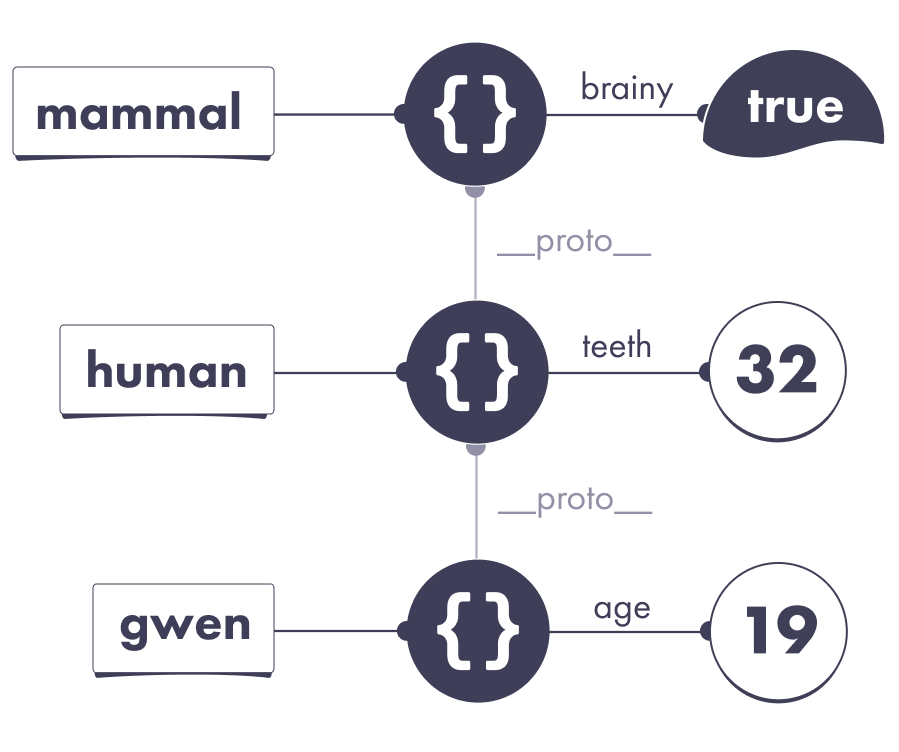
This is similar to saying, “I don’t know, but Alice might know.” Then Alice might say, “Actually, I don’t know either—ask Bob.” Eventually, you will either arrive at the answer or run out of people to ask!
This sequence of objects to “visit” is known as our object’s prototype chain. (However, unlike a chain you might wear, prototype chains can’t be circular!)
Shadowing
Consider this slightly modified example:
let human = {teeth: 32};let gwen = {__proto__: human,// This object has its own teeth property:teeth: 31};
Both objects define a property called teeth, so the results are different:
console.log(human.teeth); // 32console.log(gwen.teeth); // 31
Note that gwen.teeth is 31. If gwen didn’t have its own teeth property, we would look at the prototype. But because the object that gwen points to has its own teeth property, we don’t need to keep searching for the answer.
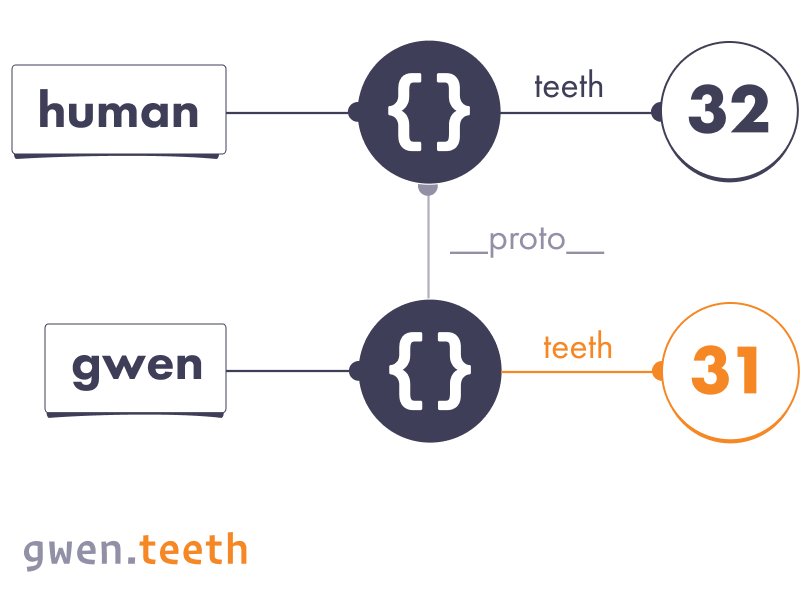
In other words, once we find our property, we stop the search.
If you ever want to check if an object has its own property wire with a certain name, you can call a built-in function called hasOwnProperty. It returns true for “own” properties, and does not look at the prototypes. In our last example, both objects have their own teeth wires, so it is true for both:
console.log(human.hasOwnProperty('teeth')); // trueconsole.log(gwen.hasOwnProperty('teeth')); // true
Assignment
Consider this example:
let human = {teeth: 32};let gwen = {__proto__: human,// Note: no own teeth property};gwen.teeth = 31;console.log(human.teeth); // ?console.log(gwen.teeth); // ?
Before the assignment, both expressions result in 32:
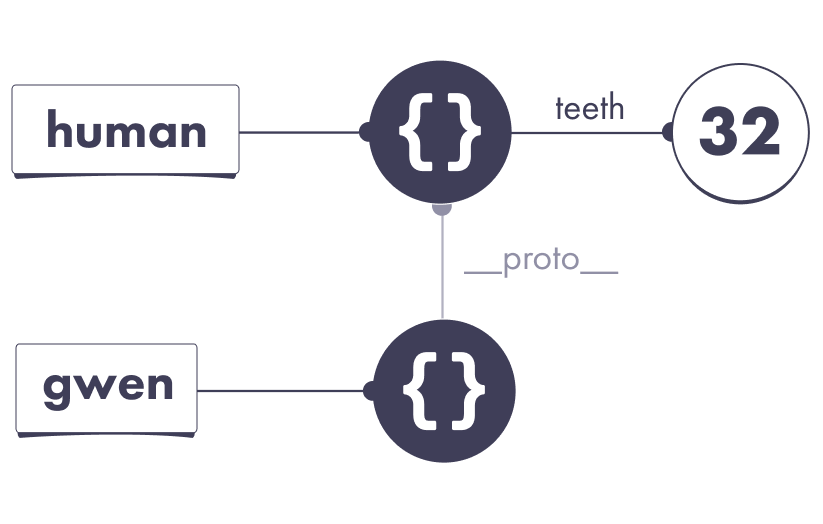
Then we need to execute this assignment:
gwen.teeth = 31;
Now the question is which wire does gwen.teeth correspond to? The answer is that, generally saying, assignments happen on the object itself.
So gwen.teeth = 31 creates a new own property called teeth on the object that gwen points to. It doesn’t have any effect on the prototype:
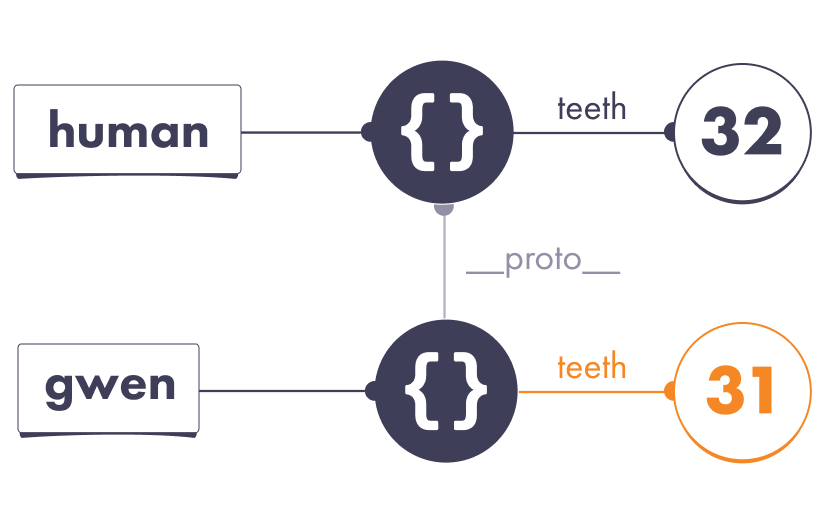
As a result, human.teeth is still 32, but gwen.teeth is now 31:
console.log(human.teeth); // 32console.log(gwen.teeth); // 31
We can summarize this behavior with a simple rule of thumb.
When we read a property that doesn’t exist on our object, we’ll keep looking for it on the prototype chain. If we don’t find it, we get undefined.
But when we write a property that doesn’t exist on our object, that creates the property on our object. Generally speaking, prototypes will not play a role.
The Object Prototype
This object doesn’t have a prototype, right?
let obj = {};
Try running this in your browser’s console:
let obj = {};console.log(obj.__proto__); // Play with it!
Surprisingly, obj.__proto__ is not null or undefined! Instead, you’ll see a curious object with a bunch of properties, including hasOwnProperty.
We’re going to call that special object the Object Prototype:
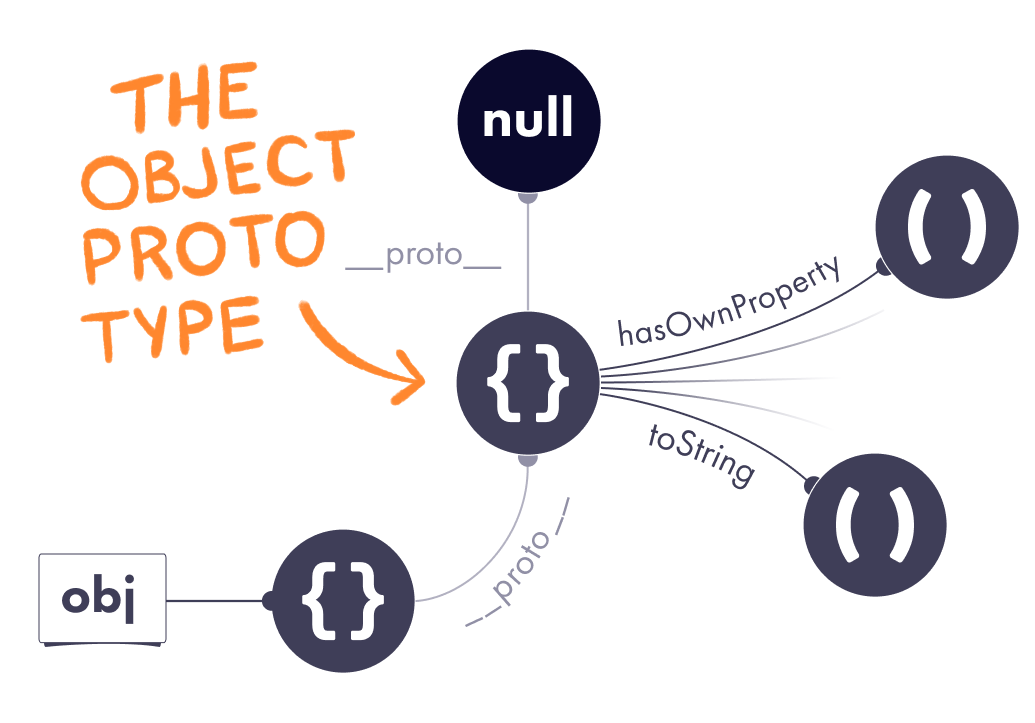
At first, this might be a bit mind-blowing. Let that sink in. All this time, we were thinking {} created an “empty” object, but it’s not so empty after all! It has a hidden __proto__ wire that points to the Object Prototype by default.
This explains why JavaScript objects seem to have “built-in” properties:
let human = {teeth: 32};console.log(human.hasOwnProperty); // (function)console.log(human.toString); // // (function)
These “built-in” properties are nothing more than normal properties on the Object Prototype. Because our object’s prototype is the Object Prototype, we can access them.
An Object With No Prototype
We’ve just learned that all objects created with the {} syntax have the special __proto__ wire pointing to a default Object Prototype. But we also know that we can customize the __proto__. You might wonder: can we set it to null?
let weirdo = {__proto__: null};
The answer is yes—this will produce an object that truly doesn’t have a prototype at all. As a result, it doesn’t even have built-in object methods:
console.log(weirdo.hasOwnProperty); // undefinedconsole.log(weirdo.toString); // undefined
You probably won’t want to create objects like this, however the Object Prototype is exactly that—an object with no prototype.
Polluting the Prototype
Now we know that all JavaScript objects get the same prototype by default. Let’s briefly revisit our example from the module about mutation:
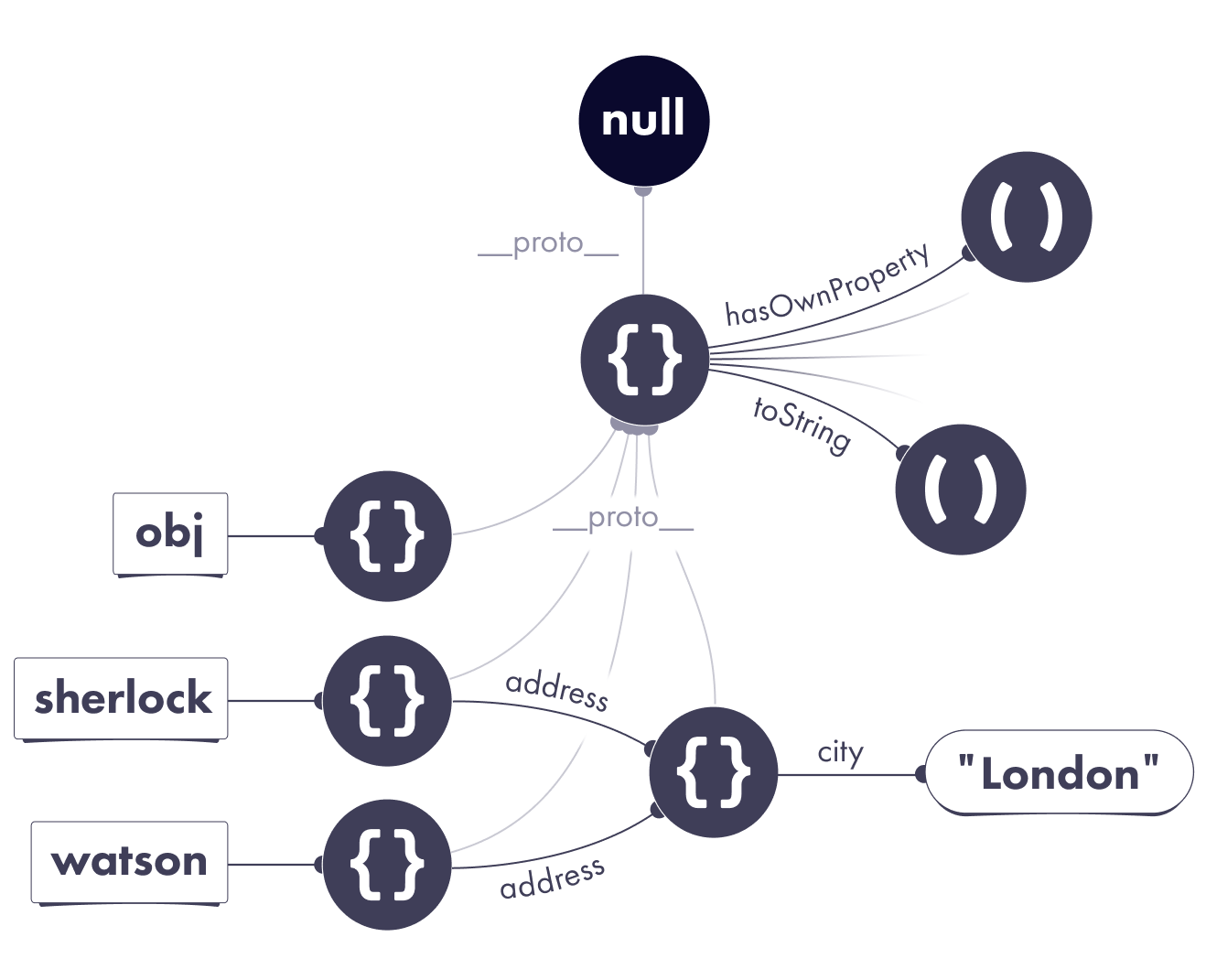
This picture gives us an interesting insight. If JavaScript searches for missing properties on the prototype, and most objects share the same prototype, can we make new properties “appear” on all objects by mutating that prototype?
Let’s add these two lines of code:
let obj = {};obj.__proto__.smell = 'banana';
We mutated the Object Prototype by adding a smell property to it. As a result, both detectives now appear to be using a banana-flavored perfume:
console.log(sherlock.smell); // "banana"console.log(watson.smell); // "banana"
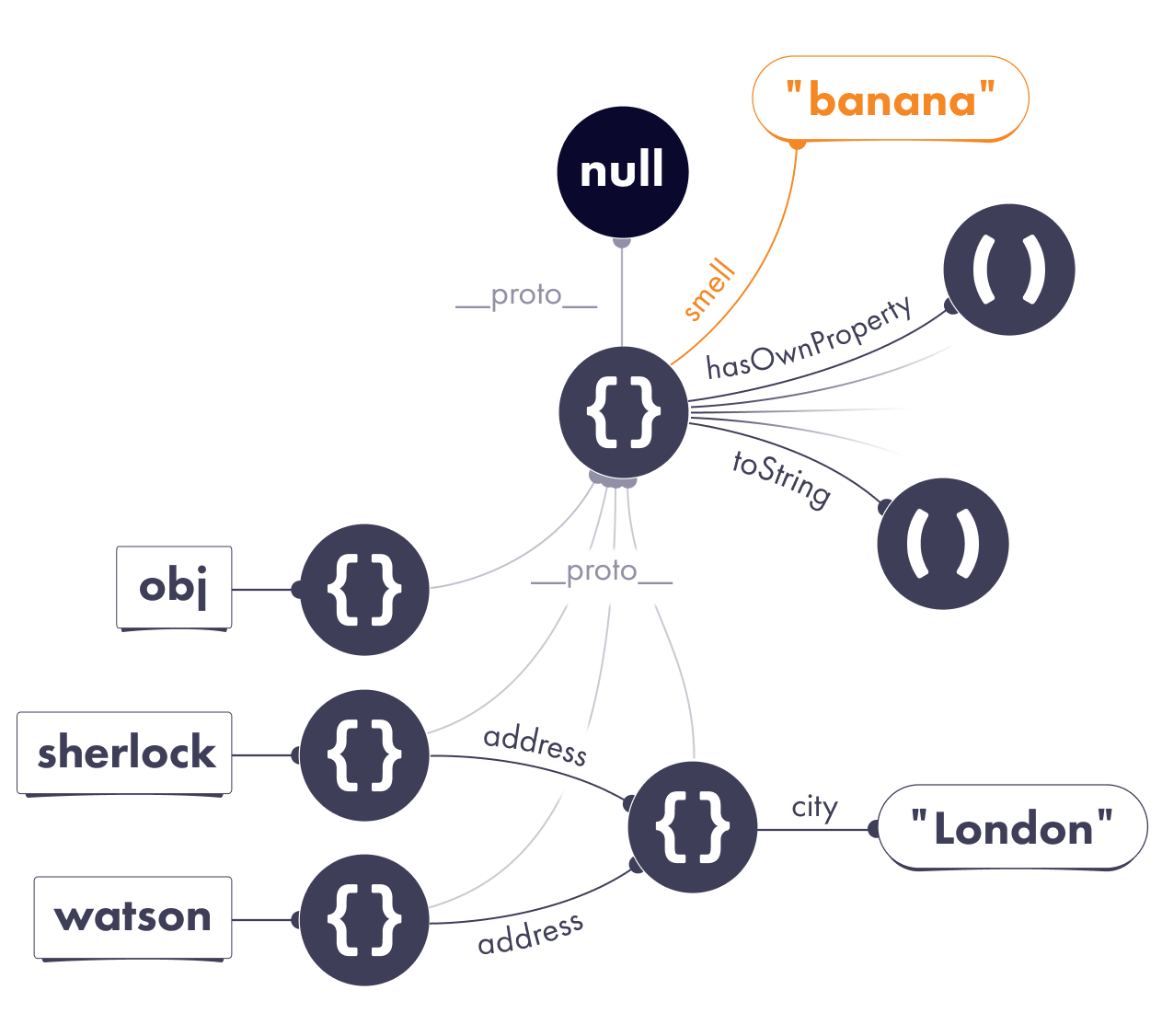
Mutating a shared prototype like we just did is called prototype pollution.
In the past, prototype pollution was a popular way to extend JavaScript with custom features. However, over the years, the web community realized that it is fragile and makes it hard to add new language features, so we prefer to avoid it.
Now you can solve the pineapple pizza puzzle from the beginning of this module! Check your solution in your console.
__proto__ vs. prototype
You might be wondering: what in the world is the prototype property? You might have seen it in MDN documentation. Before JavaScript added classes, it was common to write them as functions that produce objects, for example:
function Donut() {return { shape: 'round' };}let donut = Donut();
You’d want all donuts to share a prototype with some shared methods. However, manually adding __proto__ to every object looks gross:
function Donut() {return { shape: 'round' };}let donutProto = {eat() {console.log('Nom nom nom');}};let donut1 = Donut();donut1.__proto__ = donutProto;let donut2 = Donut();donut2.__proto__ = donutProto;donut1.eat();donut2.eat();
This is why JavaScript has a new keyword. When you put the new keyword before the Donut() function call, two things happen:
- The object is created automatically, so you don’t need to return it from
Donut. (It becomes available asthis.) - That object’s
__proto__will be set to whatever you put into the function’sprototypeproperty.
function Donut() {this.shape = 'round';}Donut.prototype = {eat() {console.log('Nom nom nom');}};let donut1 = new Donut(); // __proto__: Donut.prototypelet donut2 = new Donut(); // __proto__: Donut.prototypedonut1.eat();donut2.eat();
A function’s prototype property lets you configure the __proto__ of the objects that you get with new calls. This is pretty confusing! It was designed this way in an attempt to appeal to people familiar with classes, which JavaScript didn’t support at the time. Now this pattern has mostly fallen into obscurity, but you can still see prototype property on the built-in functions (and even on classes!) In modern code, you would usually write a class with a constructor instead:
class Donut {constructor() {this.shape = 'round';}eat() {console.log('Nom nom nom');}};let donut1 = new Donut(); // __proto__: Donut.prototypelet donut2 = new Donut(); // __proto__: Donut.prototypedonut1.eat();donut2.eat();
But under the hood, donut1.eat() still “finds” the eat property by looking it up via __proto__.
Why Does This Matter?
In practice, you probably won’t use prototypes in your code directly. (In fact, even using the __proto__ syntax is discouraged.)
Prototypes are unusual—most frameworks never embraced them as a paradigm. Still, you will notice prototypes hiding “beneath the surface” of other JavaScript features. For example, people often use prototypes to create a traditional “class inheritance” model that’s popular in other programming languages.
This became so common that JavaScript added a class syntax as a convention that “hides” prototypes out of sight. To see it in action, look at this snippet of a JavaScript class rewritten with __proto__ for a comparison.
Personally, I don’t use a lot of classes in my daily coding, and I rarely deal with prototypes directly either. However, it helps to know how those features build on each other, and it’s important to know what happens when I read or set a property on an object.
Recap
- When reading
obj.something, ifobjdoesn’t have asomethingproperty, JavaScript will look forobj.__proto__.something. Then it will look forobj.__proto__.__proto__.something, and so on, until it either finds our property or reaches the end of the prototype chain. - When writing to
obj.something, JavaScript will usually write to the object directly instead of traversing the prototype chain. - We can use
obj.hasOwnProperty('something')to determine whether our object has its own property calledsomething. - We can “pollute” a prototype shared by many objects by mutating it. We can even do this to the Object Prototype—the default prototype for
{}objects! (But we shouldn’t, unless we’re pranking our colleagues.) - You probably won’t use prototypes much directly in practice. However, they are fundamental to JavaScript objects, so it is handy to understand their underlying mechanics. Some advanced JavaScript features, including classes, can be expressed in terms of prototypes.
Exercises
This module also has exercises for you to practice!
Don’t skip them!
Even though you’re likely familiar with the concept of prototypes, these exercises will help you cement the mental model we’re building. We need this foundation before we can get to more complex topics.